By Daniel Mercer · Updated October 7, 2026
Drip alternatives for ecommerce brands
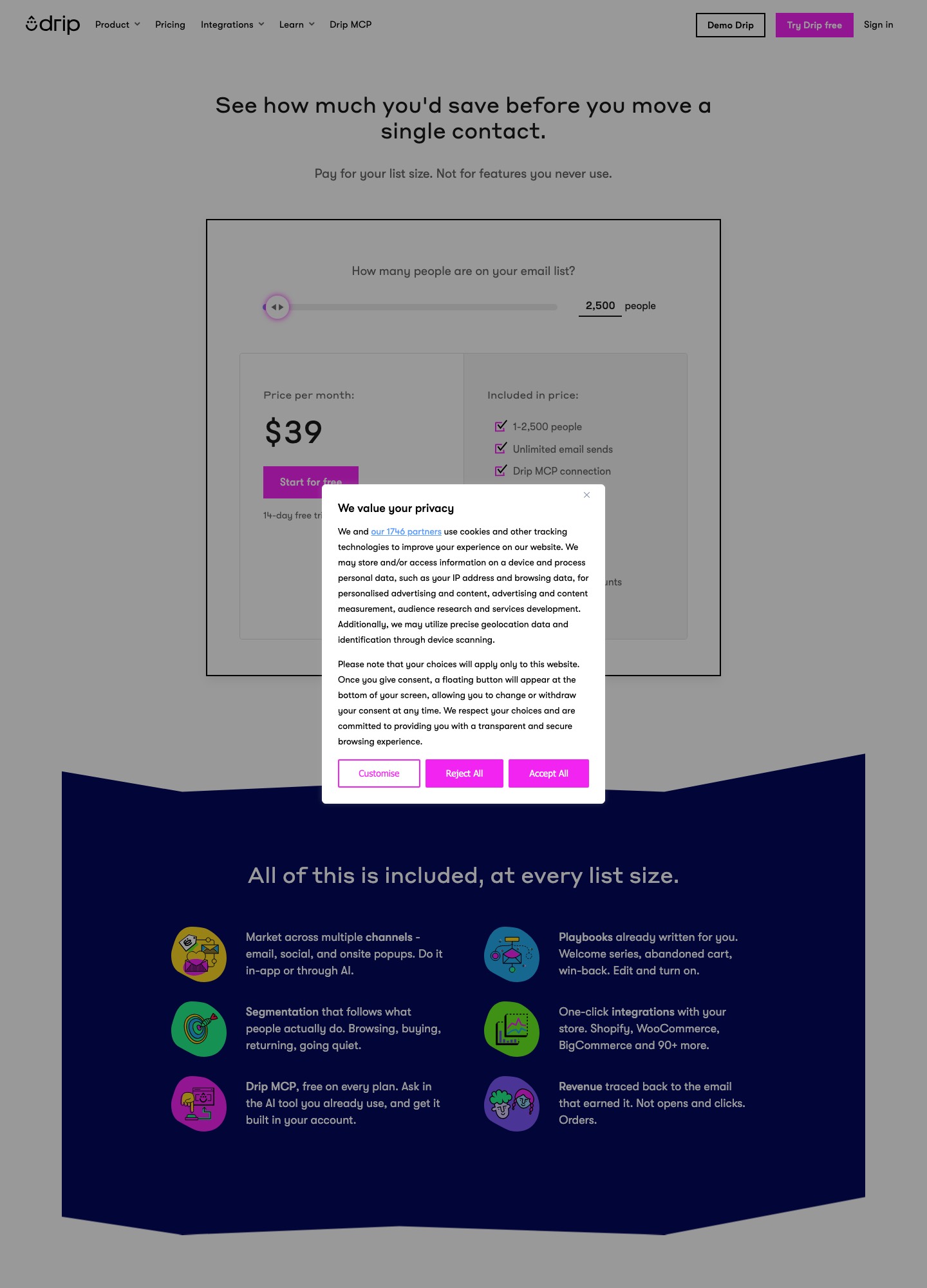
Drip's published price is simple: $39 a month for 1 to 2,500 people, flat across that band. The reasons people look elsewhere are not in the first band. There is no free plan, only a 14-day trial; the bill follows a high-watermark rule that charges for your peak month; and cost depends on both active people and email volume. If you want a free runway to test with, Klaviyo and Omnisend both publish a free plan of 250 profiles or contacts and 500 emails a month. If you want deeper CRM logic, ActiveCampaign Plus is $49 at 1,000 contacts. If your priority is one vendor for receipts and campaigns, Brevo is the one to price.
Prices were read from vendor pages on October 7, 2026. Drip's own page defaults its selector to 2,500 people, the top of the first band, so the $39 on the capture below is the most that band charges. Klaviyo's paid rates sit behind a selector and are not quoted here; its billing rules are, because the contrast with Drip's is the useful part.
Pick by what you want to change about Drip
| What you want | Look at | Price (vendor page) | What to check |
|---|---|---|---|
| A free way to test before paying | Klaviyo | Free: up to 250 profiles and 500 emails a month; paid price on a selector | Any profile that can be emailed counts as billable, whatever its consent status |
| A store-focused tool with a cheaper bottom end | Omnisend | Free: 250 contacts, 500 emails, 500 web push. Standard $11.20 a month at 500 contacts (offer rate) | The offer covers three months, and SMS is billed separately |
| Deeper CRM and automation logic | ActiveCampaign | Starter $15, Plus $49, Pro $79 a month at 1,000 contacts, billed annually | Starter allows 5 actions per automation; no free plan |
| Cart recovery and funnels at a fixed list-size price | GetResponse | Starter $19, Marketer $59 a month for a 1,000-person list | Abandoned-cart recovery is a Marketer feature |
| Order messages and campaigns from one vendor | Brevo | Free: 300 emails a day. Starter $9, Standard $18 a month | Priced by emails sent, each tier tied to a contact ceiling |
| A familiar editor and wide store connectors | Mailchimp | Free: 250 contacts, 500 sends. Standard $20 a month at 500 contacts | Bands rise quickly: $100 at 2,501–5,000 contacts |
How Drip builds your bill
You pay for last month’s peak
Drip's article How We Calculate Your Bill says the total is based on the number of active people, the number of emails you send, and, where SMS is on, SMS subscribers and message segments. At the end of the 14-day trial your plan is set from the highest number of active people you reached during the trial. After that the billing cycle closes on the same day each month as your first payment, and you are billed for the previous month's usage, not for what you have at the moment of the invoice.
Drip calls this a high watermark system: a line is drawn at the highest level reached in the period, and removing people afterwards does not erase it. Its own invoice example shows service from August 25 to September 25 charged on usage from July 25 to August 25. The practical result is that a one-week spike sets that month's bill. A store at 2,100 active people that imports 900 buyers from a marketplace for a promotion, and removes them a week later, has still reached 3,000, which is past the 2,500-person limit of the first displayed band. Drip says an account that deletes or deactivates people mid-period is still billed for the highest count, then downgraded automatically for the next period.
Unsubscribed people can still be billed
Drip's Active People article describes the "All active people" filter as everyone in your account that you can engage with and are billed for, and lists unsubscribed people as a subset of active people, who can still receive transactional email and trigger workflows. The billing article adds that if Support All People is enabled you must deactivate people in a pruning operation to take them off the active list. Inactive people do not appear on the billing statement, though anyone active at any point in the cycle counts towards that cycle's total.
Deactivated customers come back when they buy
Reactivating an inactive person means you will be billed for them again. The Inactive People article adds that if you have an order management system connected or use the Shopper Activity API, inactive customers are reactivated when they perform a "Placed an order" event. That is good news commercially and a surprise on the invoice if you pruned aggressively. Drip says its Support team can help set up an automation to keep chosen customers inactive.
Several accounts add together
If your subscription holds more than one account, Drip charges for the total people count across all of them. A brand with a main store and a wholesale site pays on the sum, so splitting a list across two accounts does not move it into a lower band.
Six alternatives, and the contrast with Drip
Klaviyo: a similar people-count rule, with a different timing
Klaviyo's free plan is up to 250 profiles and 500 emails a month, and its billing article defines an active profile as any profile that can be emailed, regardless of consent. Drip's "active people" works in a comparable way, so moving does not escape the count. The timing differs: Klaviyo sets your monthly tier from the billable profiles you have at the time of billing, and says it takes up to 72 hours for suppressions and deletions to be reflected, while Drip charges on last month's peak. For a store with seasonal spikes that difference can matter more than the headline rate. Klaviyo's paid prices are on its selector, so price your own count there. The Drip vs Klaviyo comparison covers features.
Omnisend: cheaper at the bottom, dearer at the top of Drip’s band
Omnisend's Standard shows $11.20 a month at 500 contacts with 6,000 emails, and Pro shows $41.30 at 2,500 contacts with unlimited emails, both at a 30% offer for the first three months. The page's totals ($48.00 and $177.00 for those three months) imply regular rates of about $16 and $59. Set against Drip's flat $39, Drip costs about $23 a month more at 500 contacts ($276 a year) and about $20 a month less at 2,500 against Omnisend's regular Pro ($240 a year). Omnisend says it bills subscribers and non-subscribers who received automated messages, and does not bill unsubscribed contacts. That last rule is the opposite of Drip's treatment of unsubscribed people.
ActiveCampaign: logic you cannot build in a flat band
At 1,000 contacts, billed annually, ActiveCampaign Starter is $15 with five actions per automation, Plus is $49, and Pro is $79 with advanced segmentation and three users. Drip's $39 includes up to 50 workflows and dynamic segments, so it sits between Starter and Plus. The reason to cross to ActiveCampaign is deal tracking and CRM-style branching, not the price. The ActiveCampaign alternatives page and the ActiveCampaign vs Drip comparison go through that decision.
GetResponse: cart recovery without a store-only tool
GetResponse prices by list size. At 1,000 people Starter is $19 a month ($15.58 billed annually) with unlimited sends and one automation workflow, and Marketer is $59 ($48.38 annually) with unlimited workflows, advanced segmentation, abandoned-cart recovery and sales funnels. At that list size Marketer costs $20 more than Drip's $39 ($240 a year), and the question is whether the funnels or webinars are worth it to you. Creator at $69 adds webinars, a website builder and a course creator.
Brevo: price by emails, and receipts included
Brevo's free plan sends 300 emails a day and includes transactional email and SMS. Starter is $9 and Standard $18 a month, priced by monthly email volume with each tier tied to a contact ceiling: 5,000 emails goes with up to 500 contacts, 15,000 with up to 2,500. A store with 2,400 people mailing weekly sends about 10,400 emails (2,400 × 52 ÷ 12) and lands in the 15,000-email tier, whose price you read on Brevo's pricing page. Advanced ecommerce features are listed under Professional at $499, so confirm that what you need sits in the plan you are pricing.
Mailchimp: broad connectors and steep bands
Mailchimp lists Shopify, WooCommerce, Square, Wix and Salesforce among its integrations. Its free plan is 250 contacts and 500 sends a month, and Standard is $20 a month at 500 contacts, $100 in the 2,501–5,000 band and $135 at 5,001–10,000, at list price. Mailchimp counts unsubscribed and non-subscribed contacts toward the limit, so it resembles Drip's treatment of unsubscribed people more than Omnisend's does. See the Mailchimp alternatives page for how those bands behave.
Where Drip’s flat band wins and loses on price
| People | Drip | Alternatives with a quoted price |
|---|---|---|
| 500 | $39 (flat for 1 to 2,500) | Omnisend Standard $11.20 offer, about $16 regular; Mailchimp Standard $20; Brevo Starter $9; MailerLite Comfort $12 |
| 1,000 | $39 | ActiveCampaign Starter $15, Plus $49; GetResponse Starter $19, Marketer $59; MailerLite Comfort $19, Power $39 |
| 2,500 | $39 (top of the band) | Omnisend Pro $41.30 offer, about $59 regular; Mailchimp $100 from 2,501 contacts |
| 5,000 | Set the selector | MailerLite Comfort $49, Power $69; Mailchimp $100 at list price |
The shape is clear. A flat band is poor value at the bottom and good value near the top. At 500 people Drip is the most expensive line on this table, because you pay for 2,500 slots you do not use. At 2,500 it undercuts the regular Omnisend Pro price while including unlimited sends. A store that sits at 800 people and expects to reach 2,400 by next year is getting its value in year two. A store that will stay at 600 is paying for headroom it will not use.
Leaving Drip: what exports and what does not
- Check what you will lose first. Drip's export guide says emails created with the visual email builder and events are not exportable. Copy your best-performing emails by hand and screenshot your workflow canvases before you export anything else.
- Export the people list. Go to People, then Active, use the filter to build the segment you want or leave it blank for the whole list, click Actions, then Export to CSV, then Okay. Drip emails a link to the address you are logged in as, which is listed under Settings, then User Settings.
- Read what the CSV carries. The people export includes email address, Drip's person ID, status (active or unsubscribed), the created and confirmed timestamps, tags, email series campaign names, referrer, landing URL, IP address, lead score, lifetime value, user ID and custom fields. Lifetime value and lead score are worth keeping as fields in the new tool.
- Keep the status column. Because unsubscribed people stay active in Drip, they appear in the file with an unsubscribed status. Import them as suppressed, and never as marketable contacts.
- Export inactive people too. The Inactive tab lists email address, lifetime value and orders recorded at the time of deactivation, and the deactivation date, and offers a CSV export. They are your lapsed customers, and a win-back campaign in the new tool may want them.
- Run the account export. Go to Settings, Account, then Export Account, then Export Account again and Okay. The guide says it includes templates, the people list and email series campaigns, again delivered as a link by email.
- Export analytics. Under Analytics you can export CSVs for new people, unsubscribes, email metrics, clicks and events, including a single campaign, series or workflow report by date range.
| What you need | Where it comes from | What to do next |
|---|---|---|
| People, tags, lifetime value and lead score | People export from the Active tab | Map to fields and tags in the new tool |
| Unsubscribed and inactive people | Status column and the Inactive tab export | Import as suppressed or as a win-back segment |
| Templates and email series campaigns | Account export | Rebuild in the new editor from the saved content |
| Visual-builder emails and events | Not exportable per the guide | Copy by hand; recreate event triggers from your store data |
| Workflows | Not described in the export guide | Rebuild from screenshots and a written map of triggers and waits |
When Drip is still the better choice
If your list is between roughly 1,500 and 2,500 people, you send often, and you want flows tied to what shoppers browse and buy, Drip's flat band is a strong price and the page's own list of included playbooks (welcome series, abandoned cart and win-back) covers the usual flows. Move if you sit under a thousand people, if your list swings sharply from month to month, or if you do not want to prune actively to control what you pay.
FAQ
Does Drip have a free plan?
No. Drip's pricing page shows a 14-day free trial with no credit card and a $39 a month starting price for 1 to 2,500 people. Klaviyo and Omnisend both offer ongoing free plans of 250 profiles or contacts and 500 emails a month, and Brevo's free plan sends 300 emails a day.
What is Drip’s high watermark billing?
Drip bills on the previous month's peak usage, the highest number of active people and email sends, and not on what you have when the invoice is issued. Removing people mid-month does not lower that month's bill, and the account is downgraded automatically for the next period.
Do unsubscribed people count towards my Drip bill?
They can. Drip describes unsubscribed people as a subset of active people, and says active people are the ones you are billed for. Inactive people are not billed, so pruning means moving them to inactive. With Support All People enabled, Drip says you must deactivate them in a pruning operation.
Can I export my Drip workflows and emails?
Not as working copies. Drip's guide says emails created with the visual email builder and events are not exportable. The account export covers templates, the people list and email series campaigns, so plan to rebuild workflows by hand from screenshots and notes.
Which alternative is cheapest at 2,500 people?
On the quoted prices, Drip's $39 undercuts Omnisend's regular Pro rate of about $59, and Mailchimp's list price from 2,501 contacts is $100. Klaviyo's paid price sits on its selector and Brevo's depends on email volume, so price both at your own numbers.
Will deactivated customers be billed again if they buy?
Yes, if you have an order management system connected or use the Shopper Activity API. Drip says inactive customers are reactivated when they perform a "Placed an order" event, and reactivated people are billed. Drip's Support team can help set up an automation to keep chosen customers inactive.
All alternatives · Drip vs Klaviyo · ActiveCampaign vs Drip · Klaviyo alternatives · ActiveCampaign alternatives · Mailchimp alternatives · Segmentation guide