By Daniel Mercer · Updated October 7, 2026
Mailchimp alternatives for small businesses and creators
If Mailchimp's price is what pushed you out, MailerLite is the closest swap, and the gap grows with the list: at list price, 5,000 contacts costs $100 a month on Mailchimp Standard against $49 on MailerLite Comfort. If you mail only a few times a month, Brevo charges by emails sent instead of by contacts and starts at $9 a month. If you are a creator who wants free forms and broadcasts for a big list, Kit is free up to 10,000 subscribers. Sender, Flodesk and Constant Contact each answer a narrower problem, and they are covered below.
Every price on this page was read from the vendor's own pricing page on October 7, 2026. Mailchimp advertises 50% off for the first 12 months on its paid tiers, so this page shows both that offer rate and the list price you pay from month 13. Comparing a rival's full price with a half-price first year flatters Mailchimp, and the second-year bill is the one that makes people leave. Vendors also count different things (contacts, subscribers, emails sent), so each figure names its unit.
Pick by the problem you are trying to solve
| Your Mailchimp problem | Move to | Entry price (vendor page) | What you give up |
|---|---|---|---|
| The bill steps up every time the list grows | MailerLite | Free to 250 subscribers; Comfort $19 a month at 1,000, $49 at 5,000, $89 at 10,000 | Less ecommerce depth, and no transactional email (MailerLite points to MailerSend for that) |
| You mail a few times a month, not every week | Brevo | Free: 300 emails a day. Starter $9 a month for 5,000 emails; Standard $18 | The price follows emails sent, so frequent senders climb tiers |
| You publish a newsletter and want to pay for automation only when you need it | Kit | Free up to 10,000 subscribers; Creator $33 a month at 1,000 subscribers, billed yearly | Visual Automations and sequences are not on the free plan |
| You want to stay free a little longer | Sender | Free: 2,500 subscribers and 15,000 emails a month, with Sender branding | Branding on every message; check its automation features against the ones you use |
| Design matters more to you than segmentation | Flodesk | Lite $25 a month ($19 billed annually) at up to 1,000 subscribers | Lite includes one workflow; unlimited workflows start on Pro |
| You promote events and local offers | Constant Contact | Lite from $12, Standard from $35, Premium from $80 a month | No free plan, and automation starts at Standard |
What makes Mailchimp expensive in practice
The free plan is small
Mailchimp's pricing page describes the Free plan as one seat and one audience, a maximum of 250 contacts, and up to 500 sends a month with no more than 250 in a day. Do the sums and a full free list can be mailed twice a month (250 contacts × 2 sends = 500). A weekly newsletter to the same 250 people needs about 1,083 sends a month (250 × 52 ÷ 12), which is more than double the allowance. Mailchimp's help article on its pricing plans adds that once you pass 250 contacts, a hold is placed on live and test sends until you upgrade or bring the count down. You can still edit emails and collect contacts in the meantime.
The price steps up faster than the list
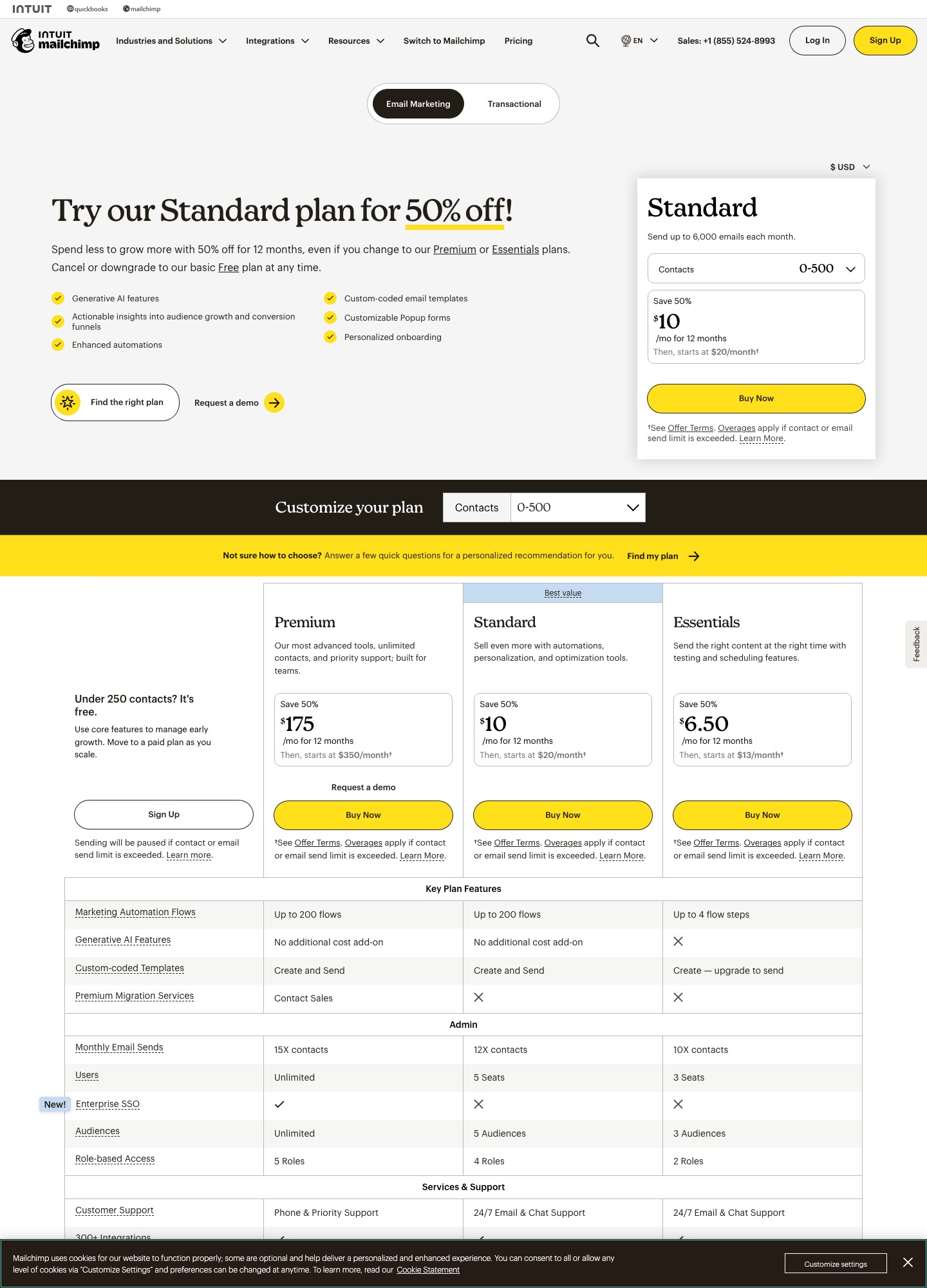
Standard is the plan most small businesses end up on, because it holds the automation tools. Its list prices below come from Mailchimp's marketing pricing page, where each band is shown as an offer price for 12 months and then "starts at" the list price.
| Contacts | Standard list price | Offer price, first 12 months | Year one | From year two |
|---|---|---|---|---|
| 0–500 | $20 a month | $10 (visible in the capture above) | $120 | $240 |
| 2,501–5,000 | $100 a month | $50 | $600 | $1,200 |
| 5,001–10,000 | $135 a month | $67.50 | $810 | $1,620 |
| 10,001–15,000 | $230 a month | $115 | $1,380 | $2,760 |
| 20,001–25,000 | $310 a month | $155 | $1,860 | $3,720 |
The first step past 2,500 contacts multiplies the entry price by five ($20 to $100), and from year two every row costs exactly double what it did in year one. The page has bands between these rows too (501–2,500 and 15,001–20,000, for example), so set the selector to your own count rather than reading across.
You pay for people you cannot email
Mailchimp's article About Your Contacts lists which statuses count toward the monthly contact limit. Subscribed contacts count, and so do unsubscribed contacts (who can still get transactional email and ads, but not marketing) and non-subscribed contacts, meaning people who bought from your store or arrived through an integration without opting in. Cleaned, pending, archived and deleted contacts do not count.
That rule has a price tag. Take a list of 5,200 contacts of which 800 are unsubscribed or non-subscribed. It sits in the 5,001–10,000 band at $135 a month. Archive those 800 and the count falls to 4,400, which is the 2,501–5,000 band at $100, a saving of $35 a month or $420 a year. The same article says an archived contact keeps its data, including identifiable information in email reports, so you lose nothing but the ability to market to them.
Going over a limit adds a charge instead of stopping you
On paid plans Mailchimp's additional charges article says it will not interrupt service when your contact total or send count exceeds the plan; you see an extra line on the bill instead. The send limit is a multiple of the contact limit: the same article gives 12 times for Standard, so one extra block of 1,000 contacts carries 12,000 extra sends. The capture lists 10 times for Essentials and 15 times for Premium. A weekly newsletter uses about 4.3 sends per contact each month and fits easily. A daily email to the whole list is 30 sends per contact and does not.
The lower tier is lighter than it looks
In the feature table in the capture, Essentials is limited to 4 flow steps, three seats and three audiences, while Standard lists up to 200 flows, five seats and five audiences. A welcome series with more than four steps therefore means Standard, and Standard is the price the comparison tables on this page use.
Six alternatives, and the reason to pick each
MailerLite: the nearest like-for-like when price is the issue
MailerLite's free plan allows 250 subscribers, two seats and 2,500 emails a month. Paid pricing is by subscriber count: Comfort is $12 a month at 500 subscribers ($10.80 billed annually) and Power is $25 ($22.50 annually). At the monthly rate Comfort is $19 at 1,000 subscribers, $49 at 5,000, $89 at 10,000 and $179 at 25,000; Power is $39, $69, $129 and $239 at the same sizes. Comfort's monthly email allowance is ten times the subscriber tier, and Power has no monthly cap.
Set those beside Mailchimp's list prices. At 5,000 contacts the gap is $51 a month ($612 a year); at 10,000 it is $46 a month ($552 a year); at 25,000 it is $131 a month ($1,572 a year) against Comfort, or $71 ($852 a year) against Power. MailerLite's page says its price scales with active subscribers, which is a different count from Mailchimp's, so the saving also depends on how many unsubscribed and non-subscribed contacts you carry today. The MailerLite vs Mailchimp comparison goes through the feature side.
Brevo: pay for emails sent, not for the size of the list
Brevo's plans article describes a free plan with 300 sends a day, storage for up to 100,000 contacts and automation for up to 2,000 of them. Starter begins at $9 a month with no daily limit, and Standard at $18 adds marketing automation for unlimited contacts, A/B testing, AI send-time optimization and advanced reports. Both paid plans are priced by monthly sends, and each tier is paired with a contact ceiling: 5,000 emails goes with up to 500 contacts, 10,000 with up to 1,500, 15,000 with up to 2,500, and the 20,000-and-up band with up to 500,000.
That pairing matters. A 3,000-contact list mailed twice a month is only 6,000 emails, but 3,000 contacts exceed the 2,500 ceiling of the 15,000-email tier, so you would buy from the top band whatever you send. Price that band at your real numbers on Brevo's pricing page before you commit. One more catch from the same article: Starter emails carry a "Sent by Brevo" logo, and removing it is a paid add-on. On the pricing page's yearly view Starter is $8.08 a month and the add-on is $10.80, a total of $18.88, which is more than Standard at $16.17, a plan that lists no Brevo logo at all. See the Brevo vs Mailchimp comparison for a feature-level view.
Kit: free to 10,000 subscribers, and paid only for automation
Kit's free plan runs up to 10,000 subscribers, with unlimited landing pages, forms and email broadcasts, tagging and segmentation, and the ability to sell digital products and subscriptions. What it leaves out is automation: Visual Automations, sequences and branding removal begin on Creator, quoted at $33 a month for 1,000 email subscribers ($390 billed yearly, which Kit says saves $78 a year). Pro is $66, shown with a $50 offer rate. Kit also lists a 14-day trial with no credit card and free migrations.
For someone on Mailchimp's 250-contact free plan who really only sends broadcasts, Kit's free plan removes the cap by a factor of 40. For someone running a welcome series, it does not, because that series is exactly what the free plan excludes. If Kit's paywall is the thing you are weighing, the Kit alternatives page covers what sits on the other side of it.
Sender: the longest free runway
Sender's free plan allows 2,500 subscribers and 15,000 emails a month, with Sender branding. A list of 2,000 mailed weekly sends about 8,667 emails a month (2,000 × 52 ÷ 12), well inside that allowance; the same list mailed daily would send 60,000 and would not fit. Paid, Standard shows $6.30 a month for 500 subscribers and 6,000 emails, with a 30% first-year discount in the displayed price, and Professional shows $10.50 for 12,000 emails with 10 role-based seats. Treat those two as first-year prices.
Flodesk: flat pricing for design-led brands
Flodesk prices by active subscribers and publishes a free plan that covers forms, landing pages and link-in-bio pages but does not send email or run workflows. Lite is $25 a month ($19 billed annually) at up to 1,000 subscribers, with unlimited sends, analytics, templates, segmentation and one workflow. Pro is $28 ($25 annually) with unlimited workflows, integrated checkout and two seats, and Everything is $54 ($49 annually). If your Mailchimp account is mostly a visually careful newsletter plus one welcome flow, Lite fits. If you run several automations, price Pro.
Constant Contact: for event and local promotion
Constant Contact has no free plan, only a trial, and its price depends on your contact count. Lite starts at $12 a month ($10.20 billed annually) with sends up to 10 times your contacts and one user. Standard starts at $35 ($29.75 annually) and adds automation, scheduling and A/B testing, 12 times contacts in sends and three users. Premium starts at $80 ($68 annually) with advanced automation, segmentation and reporting, 500 SMS a month, unlimited users and sends up to 24 times contacts. It earns its place for businesses that live on event invitations and local offers. The Constant Contact vs Mailchimp comparison sets the two side by side.
What each option costs at five list sizes
| List size | Mailchimp Standard (list price) | MailerLite Comfort / Power (monthly rate) | Other tools, in their own units |
|---|---|---|---|
| 500 | $20 a month | $12 / $25 ($10.80 / $22.50 billed annually) | Brevo Starter $9 for 5,000 emails; Sender Standard $6.30 (first-year discount shown) |
| 1,000 | Set the selector on the pricing page | $19 / $39 | Flodesk Lite $25 ($19 annually); Kit Creator $33 (billed yearly) |
| 5,000 | $100 a month (2,501–5,000 band) | $49 / $69 | Brevo prices the emails you send; read the band that matches your volume |
| 10,000 | $135 a month (5,001–10,000 band) | $89 / $129 | EmailOctopus Pro $9 a month billed yearly, with the selector at 10,000 subscribers and 10,000 emails a month |
| 25,000 | $310 a month (20,001–25,000 band) | $179 / $239 | Flodesk Lite covers up to 25,000 subscribers; read its price at that count |
A worked case: a florist with 4,000 contacts sends two newsletters a month and a three-email welcome series, about 8,000 emails plus the series. On Mailchimp Standard that is the 2,501–5,000 band: $50 a month for the first year ($600), then $100 ($1,200 a year). On MailerLite the 5,000-subscriber band holds a list of 4,000, and Comfort at $49 a month is $588 a year. In year one the two are almost level ($600 against $588), because Mailchimp's offer halves its price. The difference is a $612 gap in every year after, which is the number to weigh against the effort of moving.
The EmailOctopus figure needs a read-through. Its pricing page shows Pro at $9 a month billed yearly with the selector at 10,000 subscribers, but the emails allowance shown at that setting is 10,000 a month, which is one send per subscriber. The free plan allows 2,500 subscribers and 10,000 emails a month, with EmailOctopus branding. Check the allowance against how often you mail before you read it as a bargain.
Leaving Mailchimp without losing what you need
- Decide who moves. Under the contact rules above, unsubscribed and non-subscribed people count toward your Mailchimp bill, and many tools price by list size too. Archive anyone you will never mail before you export, or keep them in a suppression file instead of the new audience.
- Export the audience. In Mailchimp go to Audience, click Export audience, then Export CSV. The export is processed in the background and Mailchimp emails you when it is ready. Per Mailchimp's export guide, only Owners and Admins can export, the files stay in your account for 30 days, and the download may be a ZIP holding separate CSVs for subscribed, unsubscribed, non-subscribed and cleaned contacts.
- Export segments, tags and groups where you rely on them. A saved segment has its own Export segment button. A tag must be saved as a segment first (choose the tag, click Save as segment, then Export CSV). A group is exported from More options, Groups, View Group, then Export segment.
- Export results separately. The same guide says contact exports do not carry open and click rates. Export email reports individually, or use the account export in the next step.
- Run an account export. Click your profile icon, then Account, then Settings, then Manage my data, tick the data types, pick a date range and click Export Data. Mailchimp's backup article says you get one account export per 24-hour period, delivered as a single ZIP on the Manage my data page, and that large accounts can take up to 24 hours.
- Rebuild what the export cannot carry. The article's list of exportable data names emails (with HTML and TXT content), audiences, reports, templates as HTML files, gallery images, SMS data, events, appointments and ecommerce products and orders. Automations are not on it. It also states that landing page, website and ad content is not available, and that billing receipts and deleted audiences are excluded.
- Run both in parallel. Authenticate your sending domain in the new tool, send a test to the same inbox from both, and cancel Mailchimp only after a full cycle of real campaigns has gone out.
| What you need | Where it comes from | What to do with it |
|---|---|---|
| Subscribed contacts | Audience export, subscribed CSV | Import as active, with consent source kept in a field |
| Unsubscribed and cleaned contacts | The same export, in their own CSVs | Import as suppressed, never as active |
| Segments you mail often | Segment export, or tag saved as a segment | Recreate as a tag or group in the new tool |
| Past results | Report exports or the account export Reports folders | Archive for reference; most tools cannot import them |
| Email templates | Account export, Templates folder (HTML) | Reuse the HTML where the new editor accepts it |
| Automations | Not in the export | Rebuild from a written map of triggers, waits and exits |
| Landing pages and signup forms | Not exportable per the backup article | Rebuild, then test each form with a real submission |
When staying is the cheaper answer
Check three things before you move. First, whether archiving non-subscribed and unsubscribed contacts drops you a band, since that costs nothing. Second, whether you use more than four automation steps: if you do not, Essentials may cover you and Standard is overkill. Third, whether your list is under 250 and your sending is under 500 emails a month, in which case the free plan already does the job and switching only adds work. If none of those apply and the second-year bill is the sticking point, move before the offer ends rather than after it.
FAQ
Is there a free alternative to Mailchimp?
Several, each with a different ceiling. Mailchimp's own free plan stops at 250 contacts and 500 sends a month. Kit is free up to 10,000 subscribers but excludes automations, Sender allows 2,500 subscribers and 15,000 emails a month with its branding, EmailOctopus allows 2,500 subscribers and 10,000 emails, MailerLite 250 subscribers and 2,500 emails, and Brevo 300 emails a day.
Why did my Mailchimp bill rise when my list barely grew?
Three usual causes. Unsubscribed and non-subscribed contacts count toward your limit, so the number Mailchimp bills can be higher than the number you can email. You may have crossed into the next band, where the price steps up sharply. Or a 50% first-year offer has ended and the "starts at" list price now applies.
Do unsubscribed contacts count toward my Mailchimp plan?
Yes. Mailchimp's About Your Contacts article lists unsubscribed and non-subscribed contacts as counting toward the monthly contact limit. Cleaned, pending, archived and deleted contacts do not count, which is why archiving people you will not mail again is the first lever for lowering the bill.
Can I export my Mailchimp automations?
Not as a working copy. Mailchimp's account export covers emails, audiences, reports, templates, gallery files, SMS data, events, appointments and ecommerce data, and automations are not on that list. Write down each trigger, wait, branch and exit, then rebuild in the new tool.
How long do I have to download a Mailchimp export?
Contact exports and their CSVs stay available in your account for 30 days, and the Exports page shows your history so you can download a file again. Account exports are limited to one per 24-hour period, so run the second one only after you have checked the first.
Which alternative is cheapest for a list of 25,000?
On list prices MailerLite Comfort is $179 a month against $310 for Mailchimp Standard, and Power is $239. Kit and Flodesk both publish prices that depend on your own subscriber count, so set their selectors to 25,000 before comparing, and remember Brevo prices by monthly emails rather than contacts.
All alternatives · MailerLite vs Mailchimp · Brevo vs Mailchimp · Klaviyo vs Mailchimp · Constant Contact vs Mailchimp · Kit alternatives · How to choose an email tool