By Daniel Mercer · Updated October 7, 2026
Klaviyo alternatives for online stores
Klaviyo is built for stores, so the useful question is which store features you actually run. If you want email and SMS in one tool at a lower entry bill, Omnisend publishes a free plan and a $11.20 Standard price at 500 contacts. If you want a flat price while your list grows, Drip charges $39 a month for anyone from 1 to 2,500 people. If your store is mostly broadcasts and a welcome series, MailerLite and Brevo cost less to carry, and GetResponse puts abandoned-cart recovery on its $59 Marketer plan.
One honest limit up front: Klaviyo's paid plan prices come from a selector on its pricing page that the page text does not publish, so this page quotes none of them. What it can quote is how Klaviyo counts what you pay for, taken from Klaviyo's own billing article, and the prices of the alternatives, read from their vendor pages on October 7, 2026. Put your own profile count into Klaviyo's selector and set the result next to the figures below.
Where Klaviyo stores usually go next
| What you want | Look at | Entry price (vendor page) | What to watch |
|---|---|---|---|
| Email and SMS in one store tool with a lower entry bill | Omnisend | Free: 250 contacts, 500 emails, 500 web push notifications. Standard $11.20 a month at 500 contacts (30% off the first three months) | The offer rate ends after three months, and SMS is priced separately from $0.007 a message |
| A flat price while the list grows | Drip | $39 a month for 1 to 2,500 people, with unlimited email sends | No free plan, only a 14-day trial; billed on active people and email volume |
| Mostly broadcasts, connected to a Shopify, WooCommerce, Wix or Square store | Mailchimp | Free: 250 contacts, 500 sends a month. Standard $20 a month at 500 contacts | Counts store customers who never opted in toward the plan, as Klaviyo does |
| Receipts, shipping updates and campaigns from one vendor | Brevo | Free: 300 emails a day. Starter $9, Standard $18 a month | Priced by emails sent; the capture lists advanced ecommerce features under Professional at $499 |
| Cart recovery on a modest budget | GetResponse | Starter $19, Marketer $59 a month for a 1,000-person list | Starter allows one automation workflow; abandoned-cart recovery is on Marketer |
| A newsletter first, with digital products or a small shop beside it | MailerLite | Free: 250 subscribers. Comfort $19 a month at 1,000, $49 at 5,000 | Less commerce-specific depth than a store-first tool |
How Klaviyo builds the bill
People who never opted in are billable
Klaviyo's article How Klaviyo billing works defines an active profile as any profile, regardless of consent status, that can be emailed through Klaviyo. It names two groups: subscribers, and people added by general engagement, such as someone who shares an email address at a store's checkout without opting in. Profiles that are suppressed, unsubscribed or deleted drop out of the billable count once Klaviyo has finished processing them, and the article warns that this can take up to 72 hours.
So a store with 3,000 emailable profiles, 700 of whom only ever typed an address at checkout, is billed for 3,000. Suppressing those 700 would bring it to 2,300, if they truly will never be marketed to. It is worth doing that sum before comparing quotes, because a tool that only bills subscribers would see a smaller list than Klaviyo does.
Two limits, not one
Profile and Email plans are based on active profiles and on emails sent in the billing cycle. The article says emails can go to any of your active profiles, and gives an equal split of 10 to each as the example. Anything that leaves the system counts: received and bounced emails count toward the limit, while skipped emails do not, and double opt-in confirmations are excluded. For a store this matters because flows send alongside campaigns. A welcome series, a cart reminder and a post-purchase message all draw from the same monthly email limit as your Friday newsletter.
What happens when you cross a limit
If your active profiles exceed your plan, Klaviyo moves you to a profile-compliant plan at the next billing cycle, and the article says you must get the count back under the limit at least 24 hours before the cycle ends if you want to avoid that. If you hit the email limit mid-month, Klaviyo describes two options: flexible overages, a one-time add-on of the next tier's allowance priced from your base plan's unit pricing, or upgrading, which the article calls generally more economical when the need is consistent. A seasonal peak such as a holiday campaign is exactly the case where a store hits the email limit with a profile count that has not changed.
The free plan is a trial-sized plan
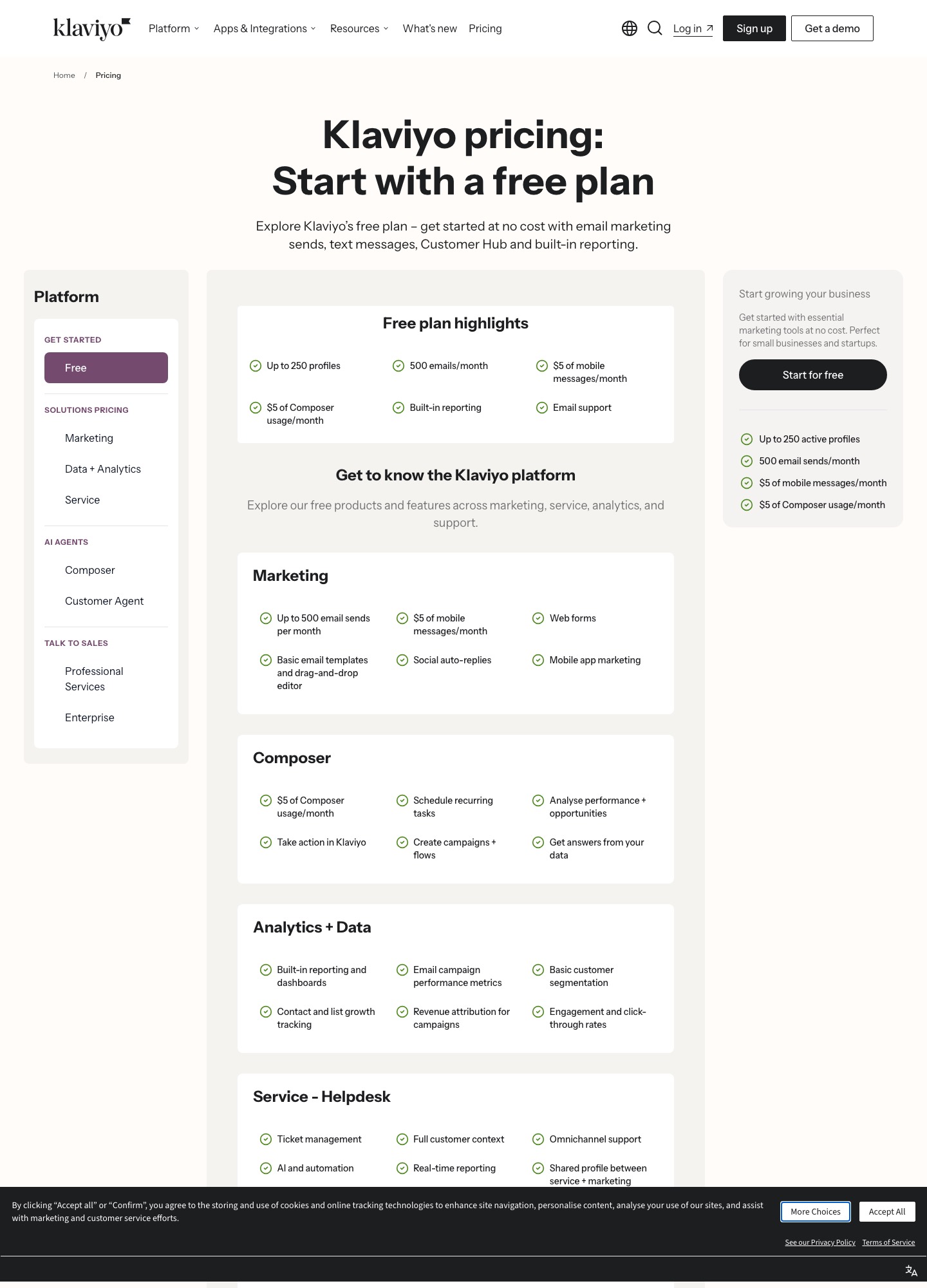
The capture shows the free plan at up to 250 profiles and 500 emails a month, with $5 of mobile messages and $5 of Composer usage. That is two emails per profile a month. The billing article adds that a free account over its profile limit is not upgraded; it simply cannot send emails or set flow emails live until it is back under the limit. The same article prices two add-ons by active profiles: Customer Hub starts at $20 a month for up to 10,000 active profiles, and Marketing Analytics at $100 a month for up to 13,500.
Six alternatives for online stores
Omnisend: closest in shape, with different counting
Omnisend's free plan mirrors Klaviyo's: 250 contacts and 500 emails a month, plus 500 web push notifications. Paid Standard shows $11.20 a month at 500 contacts for 6,000 emails, and Pro shows $41.30 at 2,500 contacts with unlimited monthly emails and SMS from $0.007 a message. Both numbers are the displayed offer (30% off the first three months). The page's own totals, $48.00 and $177.00 for those three months, imply regular rates of about $16 and $59 a month, so budget on those. Omnisend says it bills subscribers and non-subscribers who received automated messages, and that unsubscribed contacts are not billed. Read the Omnisend vs Klaviyo comparison for the feature side.
Drip: a flat band for ecommerce brands
Drip's page lists $39 a month for 1 to 2,500 people, including unlimited email sends, dynamic segments, onsite campaigns and up to 50 workflows, and describes ecommerce revenue attribution among its features. The price is flat inside that band, so a store at 2,400 people pays what a store at 1,100 pays. Billing follows a high-watermark rule, covered on the Drip alternatives page, and SMS is billed separately by subscribers and message segments. There is a 14-day trial with no credit card. See Drip vs Klaviyo for the comparison itself.
Mailchimp: broad connectors, same people-who-never-opted-in rule
Mailchimp lists Shopify, WooCommerce, Wix and Square among its integrations. Free is 250 contacts and 500 sends a month; Standard is $20 a month at 500 contacts and $100 in the 2,501–5,000 band (list price). Its contacts article says non-subscribed contacts, including those from an online store or an integration, count toward the plan, so moving here does not escape the checkout-address problem. It does fit a store that mostly sends broadcasts. See Klaviyo vs Mailchimp.
Brevo: order messages and campaigns together
Brevo's free plan includes transactional email and SMS alongside campaigns, capped at 300 emails a day, and Starter at $9 and Standard at $18 remove that cap. Plans are priced by monthly email volume, with each tier paired to a contact ceiling (5,000 emails with up to 500 contacts, up to 2,500 contacts at 15,000 emails). The ecommerce-specific items sit higher: Brevo's pricing page lists advanced ecommerce features under Professional, which starts at $499 a month. It suits a store whose most important messages are order confirmations and whose marketing is light.
GetResponse: cart recovery without a store-only tool
GetResponse prices by list size: at 1,000 people Starter is $19 a month ($15.58 billed annually) and Marketer is $59 ($48.38 annually). Starter has unlimited sends and one automation workflow. Marketer adds unlimited workflows, advanced segmentation, abandoned-cart recovery and sales funnels, which is the plan a store needs, so the $59 is the number to hold against Klaviyo. Creator is $69 and adds webinars, a website builder and a course creator, which suits a seller of courses more than a shop.
MailerLite: a light option for small shops
MailerLite's free plan allows 250 subscribers and 2,500 emails a month. Comfort is $19 a month at 1,000 subscribers and $49 at 5,000; Power is $39 and $69. Its features include automation, landing pages and digital products. That makes it a fit for a newsletter with a small shop beside it, such as a creator selling downloads. Before moving a store with real cart and purchase flows, rebuild one of them in a trial and look for the trigger you rely on.
What stores pay at four list sizes
| Profiles or contacts | Klaviyo | Priced by list size | Other units |
|---|---|---|---|
| 250 to 500 | Free to 250 profiles; paid price on its selector | Mailchimp Standard $20 at 500; MailerLite Comfort $12 at 500 ($10.80 billed annually) | Omnisend Standard $11.20 (offer rate); Brevo Starter $9 for 5,000 emails |
| 1,000 | Selector | MailerLite Comfort $19, Power $39; GetResponse Starter $19, Marketer $59 | Drip $39 (flat for 1 to 2,500 people) |
| 2,500 | Selector | Mailchimp: the band above 2,500 is $100 a month at list price | Drip $39; Omnisend Pro $41.30 (offer rate, about $59 regular) |
| 5,000 | Selector | MailerLite Comfort $49, Power $69; Mailchimp $100 in the 2,501–5,000 band | Brevo: price the tier that matches both sends and contacts |
A worked case: a skincare store has 2,500 profiles, of whom 600 never opted in, and sends weekly campaigns plus three automated flows. On Klaviyo all 2,500 count, so the first step is to suppress the 600 if they will not be mailed, then read the selector at 1,900. On Drip the same store pays $39 either way, because 1,900 and 2,500 sit in one band. On Omnisend Pro it sees $41.30 for the first three months and about $59 after. On GetResponse Marketer it pays $59 at a 1,000-person list, and the price moves with list size, so enter 1,900 on the page. The pattern to take from it: a flat band rewards a list that sits near the top of the band, and any tool that bills people who never opted in rewards cleaning the list first.
Leaving Klaviyo: its own checklist, in a workable order
Klaviyo publishes a 12-step article, How to migrate off of Klaviyo. The steps below follow it, with the new tool built before the old one is switched off.
- Build the new flows first. Recreate the welcome, cart and post-purchase flows in the new tool while Klaviyo keeps running, and send test purchases through both.
- Export lists and segments. Open Audience, then Lists and Segments, open the list or segment, choose Manage List, then Export List to CSV, and pick the properties. Only Owner, Admin and Analyst roles can export, and finished files are available under Settings, Other, Downloads for 30 days.
- Export everyone, including people you cannot email. Klaviyo's export-all article says to create a segment of people who can or cannot receive email marketing, then export it. Never send to that segment, since it holds people who have not opted in.
- Export the suppression list. Go to Audience, Profiles, click Suppressed Profiles in the upper right, then Export CSV. Import it as suppressed in the new tool.
- If you send SMS, export consent evidence. Klaviyo recommends exporting the SMS consent timestamp and phone number for each contact. To keep your sending number you must port it through your new SMS provider, and branded sender IDs cannot be ported, though you can create the same ID with the new provider.
- Export templates. In Content, Templates, open the options menu on a template and choose Export to get its HTML.
- Switch flows to draft, not delete. Klaviyo recommends Manage Flow, then Update All Action Statuses, because deleted flows and their data cannot be recovered. Then delete scheduled campaigns one by one from the Campaigns tab filtered to Scheduled.
- Retire forms, hosted pages and code snippets. Set old forms to draft, since deleting forms erases their data. Remove links to custom hosted pages, and delete the Active on Site and Viewed Product tracking snippets if you added them by hand.
- Remove integrations, export analytics, then cancel. Klaviyo recommends removing your ecommerce platform integration before you cancel, so new data stops syncing. Custom reports and flow analytics can be exported from the Analytics and Flows tabs. Cancelling follows Klaviyo's separate cancellation article.
| What you need | Where it comes from | What happens next |
|---|---|---|
| Marketable profiles | List or segment export to CSV | Import with consent source and date in fields |
| People who cannot be emailed | All-inclusive segment and the suppression export | Import as suppressed so they are never mailed |
| SMS consent | Consent timestamp and phone number columns | Give the new SMS provider the proof it asks for |
| Email templates | Per-template HTML export | Reuse where the new editor accepts raw HTML |
| Flow logic | Not listed among Klaviyo exports | Rebuild from a diagram of triggers, filters and splits |
When Klaviyo is still the better fit
If your revenue depends on browse, cart and purchase events being usable in segments, and your profile list is already clean, leaving may cost more in rebuilt flows than it saves. The same goes for a store under 250 profiles and 500 emails a month, which the free plan already covers. Spend an hour first on the cheaper levers: suppress profiles you will not market to, then see where Klaviyo's selector lands.
FAQ
Is there a free alternative to Klaviyo?
Yes, with different caps. Klaviyo's own free plan is 250 profiles and 500 emails a month. Omnisend's is 250 contacts, 500 emails and 500 web push notifications, Mailchimp's is 250 contacts and 500 sends, MailerLite's is 250 subscribers and 2,500 emails, and Brevo's is 300 emails a day.
Does Klaviyo charge for unsubscribed profiles?
Not once they are fully processed as suppressed. Klaviyo's billing article says suppressed and unsubscribed profiles are not in the billable count. People who can still be emailed do count, even if they never opted in, such as someone who left an address at checkout.
Why did my Klaviyo bill jump?
Two usual reasons. Your active profiles passed your plan limit, so Klaviyo moved you to the next profile-compliant plan at the next billing cycle. Or you hit your email limit in a busy month and used flexible overages or an upgrade. Check which limit you crossed before you assume the price itself changed.
Can I export my Klaviyo flows?
Klaviyo's migration article covers exporting contacts, suppressions, templates and analytics. Flows are not on that list, and the article recommends setting them to draft rather than deleting them because deleted flows cannot be recovered. Rebuild each flow from a written map.
Do I lose my SMS number if I leave?
Not necessarily. Klaviyo says you can port the number to your new SMS provider, which starts with that provider's request. Branded sender IDs cannot be ported, but you can create the same sender ID with the new provider. Removing a number inside Klaviyo is permanent.
Which alternative is best if I run a Shopify store?
That depends on the connector and the flows you need, and this page cannot rank it for you. Test the cart, browse and post-purchase triggers you use in a trial of Omnisend, Drip and the other tool you are weighing, with a handful of real test orders, before you move a live list.
All alternatives · Omnisend vs Klaviyo · Drip vs Klaviyo · Klaviyo vs Mailchimp · Drip alternatives · Omnisend alternatives · Segmentation guide