By Daniel Mercer · Updated October 7, 2026
ActiveCampaign alternatives for marketing email
The best ActiveCampaign alternative depends on what made you start looking. If the bill is the problem, Brevo starts at $9 a month for 5,000 emails and MailerLite at $12 a month ($10.80 billed annually at 500 subscribers), and both have free plans. If you want ActiveCampaign-style automation for less, GetResponse Marketer is $59 a month for a 1,000-person list against $79 for ActiveCampaign Pro. If sales lives in the CRM, HubSpot is the nearest like-for-like, and if you sell products, Drip and Omnisend are built around the store.
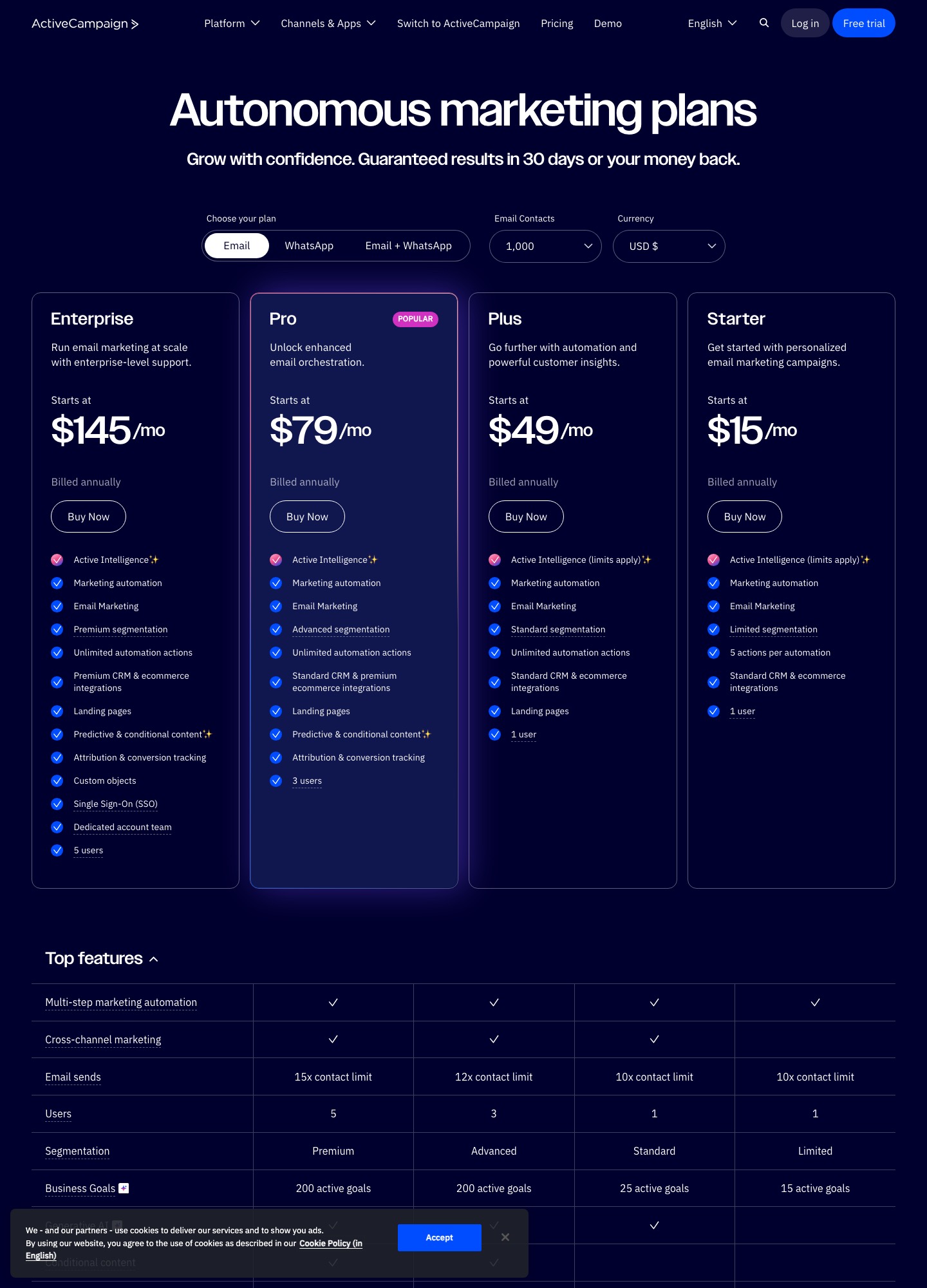
Every price here was read from the vendor's own pricing page on October 7, 2026. Vendors bill by different units (contacts, subscribers, monthly emails, people on the list), so each comparison names the unit. ActiveCampaign's figures come from the capture shown below, taken with the contact selector at 1,000.
The short answer, by reason for leaving
| Why you are leaving | Look at | What it costs (vendor page) | The trade-off |
|---|---|---|---|
| The bill climbs with your contact count | Brevo | Free: 300 emails a day. Starter $9 a month for 5,000 emails; Standard $18 adds automation and A/B testing | Paid tiers are priced on monthly emails, so a list mailed daily pays more than one mailed weekly |
| You send a newsletter and a few automations | MailerLite | Free: 250 subscribers and 2,500 emails. Comfort from $12 a month; Power $25 with unlimited monthly emails | Less CRM and commerce depth than ActiveCampaign |
| You want advanced segmentation for less than ActiveCampaign Pro | GetResponse | Starter $19 and Marketer $59 a month for a 1,000-person list | Starter allows one automation workflow, so the plan that matters is Marketer |
| Sales needs deals and a pipeline next to email | HubSpot | Free tools with 2,000 sends a month; Starter from $7; Professional from $800 | The step from Starter to unlimited automation is large |
| You run an online store | Drip or Omnisend | Drip $39 a month for 1 to 2,500 people; Omnisend free up to 250 contacts, Pro $41.30 at 2,500 contacts (offer rate shown) | Both assume a connected store, and SMS consent is separate from email consent |
| You only need the cheapest working newsletter | Sender | Free: 2,500 subscribers and 15,000 emails a month, with Sender branding | Branding on the free plan; check its automation features against yours |
| You run events and local promotions | Constant Contact | Lite from $12, Standard from $35, Premium from $80 a month | Automation starts at Standard, and there is no free plan |
Why teams leave ActiveCampaign
The price follows your contact count
ActiveCampaign's pricing page shows Starter at $15 a month, billed annually, with the selector at 1,000 contacts. That is $180 a year, a fair entry price. It does not stay there. In its own March 2026 article on the cost of email marketing at 10,000 contacts, ActiveCampaign puts Starter at $149 a month at that list size, about 9.9 times the 1,000-contact price for ten times the contacts. The same article says ActiveCampaign charges once per unique contact however many lists or tags a person is on, which matters if your current tool counts someone once per list.
Who counts as a contact has also changed. ActiveCampaign's help article on contact limits says that accounts created on or after November 3, 2025 count every contact toward the limit whatever its list status, including unsubscribed and bounced ones, while accounts created on or before November 2, 2025 count only active contacts. If yours is the newer kind, a list full of people who left is still billable.
The cheap plan is a small plan
Starter gets you into marketing automation, but with ceilings. The pricing page lists limited segmentation, 1 user and 5 actions per automation, and ActiveCampaign's help article on automation actions confirms that Starter plans can have up to five actions in an automation. A welcome series of three emails with a wait and a tag between them reaches that limit quickly, if each step counts as an action. Unlimited actions start on Plus.
| Plan | At 1,000 contacts, billed annually | Per year | Email sends | Segmentation | Users |
|---|---|---|---|---|---|
| Starter | $15 a month | $180 | Up to 10 times contacts | Limited | 1 |
| Plus | $49 a month | $588 | Up to 10 times contacts | Standard | 1 |
| Pro | $79 a month | $948 | Up to 12 times contacts | Advanced | 3 |
| Enterprise | $145 a month | $1,740 | Up to 15 times contacts | Premium | 5 |
Plus costs 3.3 times Starter. Pro, where advanced segmentation, three users and the 12-times send allowance arrive, costs 5.3 times Starter. For many small teams the plan that does what they wanted is $49 to $79 a month at 1,000 contacts, and that figure, not $15, is the one to hold up against the alternatives.
A broad platform sells add-ons
The pricing page lists transactional email, SMS, WhatsApp messaging and enhanced CRM (Pipelines and Sales engagement) as add-ons, and it shows lead scoring under the Pipelines add-on rather than in the base plans. It also advertises 950+ automation recipes and 1,000+ integrations. That breadth is valuable if you use it. If you send a newsletter and a welcome series, you are paying for an interface wide enough to hide the three things you do.
There is no free plan
The pricing page advertises "guaranteed results in 30 days or your money back" and a free trial, not a free tier. A business with a few hundred contacts can run for nothing elsewhere: MailerLite and Mailchimp both stop at 250 contacts or subscribers, Sender allows 2,500, and Brevo and HubSpot cap sends instead.
The best ActiveCampaign alternatives by use case
Brevo: best when the bill is the reason
Brevo's paid tiers are priced on monthly emails rather than on how many contacts you hold. Starter is $9 a month for 5,000 emails with no daily cap, and Standard is $18 for 5,000 emails with automation, A/B testing and advanced reports. A 1,000-contact list mailed weekly sends about 4,300 emails a month (1,000 × 52 ÷ 12), which fits inside 5,000. The free plan allows 300 emails a day, stores up to 100,000 contacts and lists 2,000 contacts in marketing automation, per Brevo's pricing page.
The catch is the unit. A business that mails its whole list daily would send about 30,000 emails a month at 1,000 contacts and need a far larger tier, so Brevo suits weekly senders best. The pricing page also lists the first tier as storing up to 500 contacts, so set your real contact count on the page and read the price it shows before you budget.
MailerLite: best for newsletters with simple automation
MailerLite's free plan allows 250 subscribers and 2,500 emails a month with two seats. Comfort starts at $12 a month ($10.80 billed annually at 500 subscribers) and Power at $25 with unlimited monthly emails, and the pricing page lists email automation, landing pages, A/B testing and digital products. For a team that uses ActiveCampaign mainly to send a newsletter and a welcome series, it is the nearest match at a lower price: 500 subscribers on Comfort is $10.80 a month annually, under the $15 ActiveCampaign charges at 1,000 contacts. MailerLite's price also rises with subscribers, so enter your own list size.
If any of your automations branch on a deal stage or a lead score, test that logic in a MailerLite trial before you commit. Those are CRM-style features that a newsletter-first tool may not mirror.
GetResponse: best for automation and webinars at a lower price
GetResponse shows Starter at $19 a month for a 1,000-person list, with unlimited sends, a welcome series, landing pages, signup forms and one automation workflow. Marketer is $59 and adds unlimited workflows, advanced audience segmentation, abandoned-cart recovery and sales funnels; Creator at $69 adds webinars, a website builder and a course creator. Annual billing saves up to $41 a year on Starter and up to $127 on Marketer.
Set it beside ActiveCampaign at 1,000 contacts. Marketer at $59 is $20 a month below Pro ($79), which is $240 a year, and $10 above Plus ($49). Because Plus carries standard segmentation and Marketer advertises advanced segmentation, Pro is the fairer rival. The tools are not feature-for-feature equal, so rebuild one real automation in a trial before you trust the saving.
HubSpot: best when the CRM is the reason to stay close to sales
HubSpot's free marketing tools include 2,000 marketing email sends per calendar month, with HubSpot branding and one automated action. Starter begins at $7 a month with up to 10 automated actions, and Professional begins at $800 a month with unlimited automation.
The gap between $7 and $800 is the decision. If your automations are short and your sales team needs one shared contact record, the lower tiers are inexpensive. If you built long ActiveCampaign automations, HubSpot's unlimited automation sits at a price that dwarfs ActiveCampaign Plus ($49) and Pro ($79) at 1,000 contacts. The ActiveCampaign vs HubSpot comparison sets the two side by side.
Drip and Omnisend: best for online stores
Drip lists $39 a month for 1 to 2,500 people, with unlimited email sends, dynamic segments and up to 50 workflows, plus a 14-day free trial with no credit card. Because the price is flat across that band, a store at 2,400 contacts pays what a store at 1,100 pays. ActiveCampaign's price, by contrast, is set by the contact selector.
Omnisend's free plan covers 250 contacts, 500 emails and 500 web push notifications a month. Paid Standard shows $11.20 a month at 500 contacts and Pro $41.30 at 2,500 contacts, both displayed with a 30% first-three-months offer, so the ongoing price is higher. Pro adds unlimited monthly emails and SMS from $0.007 per message. If your ActiveCampaign flows are carts and purchases, read the ActiveCampaign vs Drip comparison too.
Sender: best for the lowest possible cost
Sender's free plan allows 2,500 subscribers and 15,000 emails a month, with Sender branding on the messages. A weekly newsletter to 1,000 subscribers uses about 4,300 emails a month, well inside that allowance. Standard shows $6.30 a month at 500 subscribers and 6,000 emails, with a 30% first-year discount in the displayed price. It suits a small publisher who needs a form, a sender and a welcome email, and it is a poorer fit if your ActiveCampaign automations branch on behavior, which you would need to check against Sender's own automation features.
Constant Contact: for events and local promotion
Constant Contact lists no free plan, only a free trial, and its starting prices vary with contact count. Lite starts at $12 a month with monthly sends up to 10 times your contacts. Standard, from $35, adds automation, scheduling and A/B testing with sends up to 12 times contacts and three users, and Premium, from $80, adds advanced automation, segmentation and reporting. At 1,000 contacts the Lite allowance is 10,000 sends, the same multiple as ActiveCampaign Starter. Pick it if your program is event invitations and local promotions, and see the Constant Contact vs Mailchimp comparison for the neighbouring decision.
What the options cost at real list sizes
| List size | ActiveCampaign (billed annually) | Alternatives (vendor page prices) |
|---|---|---|
| 500 contacts or subscribers | The capture was taken at 1,000; set the selector to 500 on the pricing page | MailerLite Comfort $12 ($10.80 billed annually); Mailchimp Standard $20; Brevo Starter $9 for 5,000 emails; Omnisend Standard $11.20 (offer rate); Sender Standard $6.30 (first-year discount) |
| 1,000 | Starter $15, Plus $49, Pro $79 | GetResponse Starter $19, Marketer $59; Flodesk Lite $25 with one workflow, Pro $28; Drip $39; Constant Contact Lite from $12, Standard from $35 |
| 2,500 | Not in the capture; set the selector on the pricing page | Drip $39 (top of its band); Omnisend Pro $41.30 (offer rate); Sender free plan holds up to 2,500 subscribers |
| 10,000 | Starter $149 a month, $1,788 a year (ActiveCampaign article, March 2026) | Read each vendor page at 10,000; MailerLite, GetResponse and Drip price by list size and Brevo by monthly emails |
A worked case: a 1,000-contact studio mails a weekly newsletter, about 4,300 emails a month, and runs a six-email welcome series. ActiveCampaign Starter's allowance of 10,000 emails and its $180 a year cover the volume, but a six-email series will not fit inside five actions per automation if every email and wait counts as one, which pushes the studio to Plus at $588 a year. The same studio on Brevo Standard ($18 a month, $216 a year, for 5,000 emails; set 1,000 contacts on its page to confirm the price) keeps full automation for less than ActiveCampaign Plus, at the cost of rebuilding every automation.
The difference at 10,000 contacts is the reason this page exists. A weekly send to 10,000 contacts is about 43,300 emails a month. That fits ActiveCampaign Starter's 100,000 allowance (10 times contacts), so the only question is price: $149 a month, $1,788 a year, for a plan that still has limited segmentation and five actions per automation.
Moving off ActiveCampaign: what to export and what to rebuild
Plan the move around your renewal date, because the prices on ActiveCampaign's page are billed annually. Keep the old account open, and read-only in practice, until the new platform has sent a full cycle of real mail.
- Decide who moves. Under the contact-limit rule above, unsubscribed and bounced contacts may be part of your bill, and in a tool that prices by list size an inactive archive raises the next invoice too. Inside ActiveCampaign, the Archive a contact action makes contacts read-only and stops them counting toward the billing limit. Import only people you can still mail.
- Export contacts. Open Contacts, click the ellipsis at the top right of the overview, choose Export, name the export without special characters (otherwise it downloads as a text document) and select your fields. ActiveCampaign's export guide says the CSV includes custom fields, lead scores, deal scores and tags in a single column, and that the download link is valid for 7 days. Contact notes cannot be exported, so copy any you need.
- Export statuses separately. The list export lets you choose Active, Unconfirmed, Unsubscribed, Bounced or Any, and adds the list name, status and date unsubscribed. Keep the Unsubscribed and Bounced files, and import them into the new tool as suppressed so those people are never mailed again.
- Translate tags and fields. A tag can mean four different things, and each one belongs somewhere different in the new tool (see the table below).
- Export deals if you use the CRM. ActiveCampaign's deal export gives a CSV with all custom deal fields plus deal ID, title, description, value, currency, status and owner. The download link expires after 30 days.
- Rebuild automations from a written map. The help articles on exporting describe contacts, lists and deals; none describes exporting an automation's logic. Plan to rebuild each one by hand (details below).
- Reconnect forms and integrations. List every signup form, site-tracking snippet and connection that feeds ActiveCampaign, including Zapier, Stripe and PayPal connections if you use them, and replace each one with a test submission.
- Run both in parallel. Send the same test messages through each platform for two weeks, check that sender domain authentication passes, and cancel the old plan only when suppression has been verified.
| What the tag recorded | Where it usually belongs | Example |
|---|---|---|
| Where someone signed up | A custom field, so it survives as data | source = pricing-page form |
| An interest or topic | A group or tag, whichever the new tool uses for segments | interest = invoicing |
| A customer status | A field, or a segment built from purchase data | customer = yes |
| An automation marker | Usually nowhere; recreate the logic in the new automation instead | welcome-sent |
For each automation, write down five things before you rebuild it: the trigger, every wait, every branch condition, the exit rule and the person who owns it. Then build it in the new tool and push a test contact through every branch. The exit rule is the one most often forgotten, and it is how a customer ends up receiving a welcome series after buying.
One caution on consent evidence. The export includes the date a contact record was created, an IP address and a user agent, but ActiveCampaign describes the IP address as the contact's most recent address at the time of export, so it does not prove where someone signed up. Keep the original form records and confirmation emails as well.
When staying is cheaper than leaving
Before you migrate, check whether a smaller plan solves the problem. If your longest automation fits in five actions and you use one seat, moving from Plus to Starter at 1,000 contacts takes the price from $588 to $180 a year, a saving of $408. If your account is on the older contact rule, only active contacts count, so clear out bounces and non-confirmers before comparing prices. If it is on the newer rule, archiving the people you will never mail again is the quickest way to lower the contact count you pay for.
Staying also makes sense if you use Pro-level segmentation, three or more users and a CRM together. Replacing that combination usually means two tools, and two bills.
FAQ
Is there a free alternative to ActiveCampaign?
ActiveCampaign has no free plan, only a trial. Free plans exist elsewhere, each with a different cap: Brevo allows 300 emails a day and 2,000 contacts in automation, MailerLite 250 subscribers and 2,500 emails a month, Sender 2,500 subscribers and 15,000 emails a month with branding, and HubSpot 2,000 marketing sends a month with branding.
Why does ActiveCampaign cost so much more at 10,000 contacts than at 1,000?
Its price is set by the contact selector. The pricing page shows Starter at $15 a month at 1,000 contacts, and ActiveCampaign's own March 2026 article gives $149 a month at 10,000. Contacts grew tenfold and the price grew almost tenfold, so a growing list changes the bill more than any feature does.
Can I export my ActiveCampaign automations?
The help articles on exporting cover contacts, lists and deals. None of the ones we read describes exporting an automation's logic, so assume you will rebuild each automation by hand from a written map of its trigger, waits, branches and exit rule.
Which alternative is closest if I use ActiveCampaign as a CRM?
HubSpot is the nearest like-for-like. Its free tools and $7 Starter plan are inexpensive, but unlimited automation begins at its $800 Professional plan, so price the tier that holds your automations rather than the entry one. Check how ActiveCampaign's Pipelines add-on and deal data map across before committing.
Will my contact count change when I switch?
It can. ActiveCampaign counts all contacts on accounts created from November 3, 2025 and only active ones on older accounts. A new platform may count differently, for example per list, per subscriber or by monthly emails, so ask how unsubscribed and duplicate contacts are billed before you import.
Should I cancel ActiveCampaign as soon as the new tool is live?
No. The prices on ActiveCampaign's pricing page are billed annually, so check your renewal date first. Keep the account until the new platform has sent a full cycle of real mail and suppression has been verified. Export again just before you cancel, because the contact download link is valid for 7 days and the deal export link for 30.
All alternatives · ActiveCampaign vs HubSpot · ActiveCampaign vs Drip · HubSpot alternatives · Mailchimp alternatives · Segmentation tools compared