By Daniel Mercer · Updated October 7, 2026
HubSpot alternatives for marketing email
People rarely leave HubSpot's email tools because they are bad. They leave because the price goes from $7 a month on Starter to $800 on Professional with nothing in between, and because the contact tier you pay for can only go up mid-term. If you used HubSpot mainly for campaigns and automation, GetResponse Marketer at $59 a month (1,000-person list) and MailerLite at $19 are the cost-saving routes. If sales follows up inside the tool, ActiveCampaign Pro at $79 and Brevo are the like-for-like options.
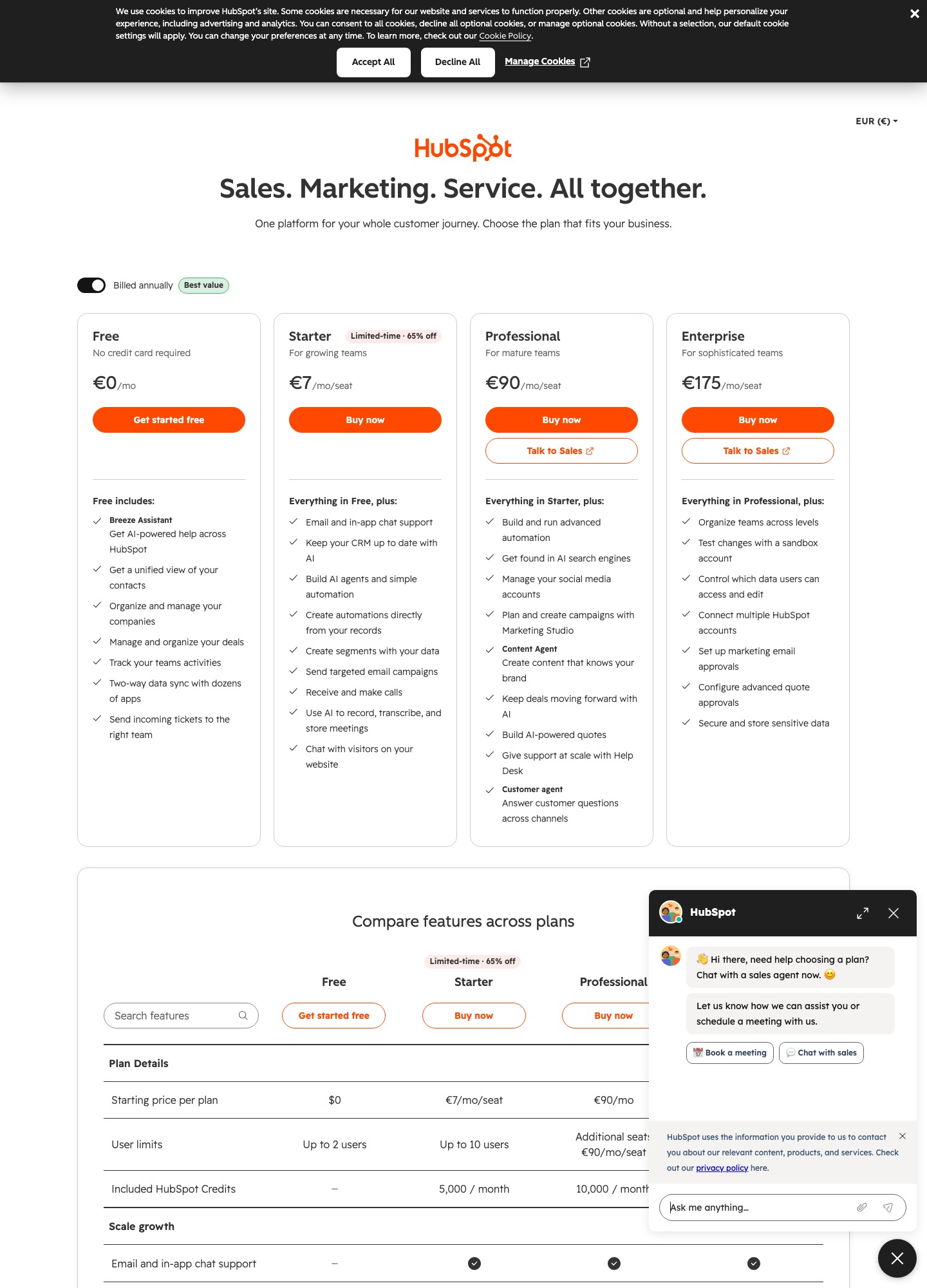
Prices come from vendor pages read on October 7, 2026. HubSpot's own pricing appears in more than one view, so the capture below and the Marketing Hub prices in the text need a note: the capture shows the all-products view in euros, charged per seat, while the Marketing Hub plans quoted in this article are priced in dollars with send limits set by your marketing-contact tier. Do not mix the two when you compare.
Match the alternative to what you used HubSpot for
| What you used HubSpot for | Look at | Price (vendor page) | What you lose |
|---|---|---|---|
| Email campaigns and automation, with the CRM barely touched | GetResponse | Starter $19, Marketer $59 a month for a 1,000-person list ($48.38 billed annually) | The shared contact record that sales and support see |
| Email, deals and follow-up tasks in one tool | ActiveCampaign | Starter $15, Plus $49, Pro $79, Enterprise $145 a month at 1,000 contacts, billed annually | Starter allows 5 actions per automation, and there is no free plan |
| A cheap start with built-in sales tools | Brevo | Free: 300 emails a day. Starter $9, Standard $18, Professional $499 a month | Priced by emails sent, and the larger team tier is Professional |
| A newsletter and a simple welcome series | MailerLite | Free: 250 subscribers. Comfort $19 a month at 1,000, $49 at 5,000 | Its listed features include no deals or companies |
| A very low entry bill | Zoho Campaigns | Forever Free; Standard US$3 and Professional US$4.50 a month, billed annually | Its page shows starting prices only, so read them at your own contact count |
| A familiar editor and broad store and app connectors | Mailchimp | Free: 250 contacts, 500 sends. Standard $20 a month at 500 contacts | Contact-based bands climb quickly: $100 in the 2,501–5,000 band |
Why HubSpot bills climb
Nothing sits between $7 and $800
On the Marketing Hub page, Free tools allow 2,000 marketing email sends per calendar month with HubSpot branding and one automated action. Starter is $7 a month with up to 10 automated actions, Professional is $800 with unlimited automation, and Enterprise is $3,600 and sold through sales. The step from Starter to Professional is a factor of about 114 ($800 ÷ $7). A team whose welcome flow needs its eleventh action, or whose program needs branching, is told to buy the plan that costs $9,600 a year.
Send limits are multiples of your contact tier
The same page ties monthly sends to your marketing-contact tier: five times the tier on Starter, ten times on Professional and twenty times on Enterprise. At a 1,000-contact tier, Starter therefore allows 5,000 sends a month. A weekly newsletter, about 4.3 sends per contact a month, fits. Mailing twice a week, about 8.7 sends per contact, does not, and that is the sending pattern that pushes a growing program to Professional.
One extra contact moves you up a tier
HubSpot's article Understand marketing contacts billing says that exceeding your contact tier by even one marketing contact upgrades you to the next tier. Its own example: a Starter account on the 1,000-contact tier holds 998 marketing contacts, adds five more to reach 1,003, and is moved to the 2,000-contact tier and billed there until its renewal date. HubSpot says downgrades happen only at renewal, and that deleting contacts later does not lower the tier mid-term.
The article also warns that tier upgrades happen automatically and cannot be prevented once the limit is crossed. To stop imports and automated tools such as workflows, forms and chatflows from creating more marketing contacts than you meant to, it recommends setting a maximum number of marketing contacts under Account and Billing. The status change from marketing to non-marketing takes effect on an update date: your monthly renewal date on monthly plans and the first of each month on yearly plans.
The free tier is a branded sampler
Free allows 2,000 sends a month, which is two sends a month to 1,000 people, and carries HubSpot branding and one automated action. It is a real way to test the CRM and send a modest newsletter, but a team that wants its own branding or a multi-step flow will leave Free the moment it does either.
Six alternatives and the reason for each
GetResponse: automation and funnels at one-tenth of the price
GetResponse prices by list size. At 1,000 people Starter is $19 a month and Marketer is $59, or $48.38 billed annually. Marketer carries unlimited workflows, advanced audience segmentation, abandoned-cart recovery and sales funnels, which covers most of what HubSpot Professional is bought for on the email side. Creator at $69 adds webinars, a website builder and a course creator. Over a year Marketer is $708 on monthly billing against $9,600 for HubSpot Professional, though the HubSpot figure covers the contact tier shown on its selector, so set both pages to the same list size.
ActiveCampaign: the closest CRM-and-email pairing
At 1,000 contacts, billed annually, ActiveCampaign Starter is $15 with one user and five actions per automation, Plus is $49, Pro is $79 with advanced segmentation and three users, and Enterprise is $145 with five users and a dedicated account team. Pro over a year is $948. Its Starter plan includes a standard CRM and ecommerce integrations according to the pricing page. For a team that replaced a spreadsheet with HubSpot's deals view, this is the nearest destination. The ActiveCampaign vs HubSpot comparison and the ActiveCampaign alternatives page cover the trade in detail.
Brevo: built-in sales tools from $0
Brevo's plans article says every plan includes free built-in sales tools to manage leads, track deals and communicate with customers. Its free plan sends 300 emails a day; Starter is $9 a month, Standard $18, and Professional $499 with 10 user seats and contact scoring on the pricing page. Placing Brevo Professional at $499 beside HubSpot Professional at $800 gives a $301 monthly gap ($3,612 a year), but the two are not feature-for-feature equal, so list the HubSpot features you really use before you count that saving. Brevo prices by monthly emails and pairs each tier with a contact ceiling, so read the tier that fits both your sends and your list.
MailerLite: when HubSpot was a newsletter tool
MailerLite's free plan allows 250 subscribers and 2,500 emails a month. Comfort is $12 at 500 subscribers ($10.80 billed annually), $19 at 1,000 and $49 at 5,000; Power is $25, $39 and $69 at the same sizes. If the contact tiers were what you paid HubSpot for and you never opened a deal, this is the least expensive route that keeps a clean editor, landing pages and automation. Deals and companies are not among its listed features, so anything sales-side stays elsewhere.
Zoho Campaigns: the lowest entry price listed
Zoho Campaigns shows a Forever Free plan, Standard at US$3 a month billed annually and Professional at US$4.50 on the same terms. Those are the lowest entry prices in this comparison, but the page presents them as starting figures, so read what you would pay at your own contact count before you treat them as a quote. It belongs on the list for a team that wants a small bill and is willing to test an editor it has not used.
Mailchimp: familiar, with fast-rising bands
Mailchimp's free plan is 250 contacts and 500 sends a month, and Standard is $20 a month at 500 contacts, then $100 in the 2,501–5,000 band and $135 in the 5,001–10,000 band at list price. It connects to Shopify, WooCommerce, Square, Salesforce and WordPress among others. Because its tiers climb steeply, it fits a smaller list best; for a larger one the Mailchimp alternatives page shows how quickly the bill moves. The Mailchimp vs HubSpot comparison is the head-to-head.
The price ladder, rung by rung
| Rung | HubSpot Marketing Hub | Closest alternatives (monthly list prices) |
|---|---|---|
| Free | Free tools: 2,000 sends a month, HubSpot branding, 1 automated action | Brevo 300 emails a day; MailerLite 250 subscribers; Zoho Campaigns Forever Free; Mailchimp 250 contacts |
| Under $20 | Starter $7: 10 automated actions, 5 times your contact tier in sends | Brevo Starter $9; ActiveCampaign Starter $15 (1,000 contacts, billed annually); GetResponse Starter $19; MailerLite Comfort $19 (1,000 subscribers) |
| $45 to $80 | No plan at this level | ActiveCampaign Plus $49 and Pro $79 (1,000 contacts, billed annually); GetResponse Marketer $59 (1,000-person list) |
| $100 to $500 | No plan at this level | ActiveCampaign Enterprise $145; Brevo Professional $499 (10 seats) |
| $800 and up | Professional $800 (unlimited automation, 10 times contact tier); Enterprise $3,600 | Read each vendor at your own volume; no alternative above is priced in this range on its page |
The ladder shows the structural problem. HubSpot's two middle rungs are empty, so the first plan with unlimited automation is $800. A worked case: a 1,000-contact consultancy runs a welcome flow of 14 actions and a twice-monthly newsletter. HubSpot Starter caps it at 10 actions, so it must buy Professional at $800 a month ($9,600 a year). GetResponse Marketer at $59 is $708 a year and lists unlimited workflows, and ActiveCampaign Plus at $49 is $588 a year, though its action limit is something to test rather than assume. The reasonable check is to build the 14-action flow in each trial and see which one runs it.
Leaving HubSpot: export, rebuild, and time the cancellation
- Check your renewal date first. HubSpot says it bills the higher contact tier until renewal and does not downgrade mid-term, so a cancellation or tier request is best timed to your renewal. Contact tier requests go through your HubSpot Contract Manager on Professional and Enterprise, or an email support ticket.
- Confirm you have export permission. HubSpot's export article says Export permissions are required to export records.
- Open the contacts view you want. Go to CRM, then Contacts (under More in some accounts). To export every contact, open the All contacts view. A saved view exports only its own records and the properties shown in it.
- Choose the properties. Click Export at the top right of the table, name the file, pick a format, and then Customize. The options are the view's properties, all properties on the records, or all properties and associations. Tick Include all email addresses if contacts have more than one address.
- Expect associations in their own columns. The same article says each associated object, such as companies or deals, gets its own column, so decide whether you also need separate exports of deals and companies from their own object views.
- Download within 30 days. HubSpot emails a download link and says the links expire after 30 days. You can run up to 300 exports in a rolling 24 hours and three at once, and a CSV over 2 MB is zipped automatically.
- Export email designs. HubSpot's marketing email export article says HTML versions help you recreate emails elsewhere. In the email editor use File, then Export email design for a draft, or the Export menu on the performance page for a sent email. You can choose PDF or HTML and whether personalization tokens are filled with a sample contact.
- Rebuild workflows from a written map. The articles above cover records and email designs. None of the ones read here describes exporting a workflow's logic, so record each trigger, branch, delay and goal by hand.
One option softens the move. The capture lists the Free tools as including a unified view of contacts, companies and deals, with two-way data sync to dozens of apps. If the CRM is the part you like, keeping the free account and moving only the email can work, as long as your new email tool is among the apps that sync. Check that before you plan around it.
Before you leave: the levers HubSpot already gives you
If the complaint is the contact tier, HubSpot's billing article describes three controls worth using before you change vendors. First, non-marketing contacts are not billed, so a CRM full of old leads, vendors and customers you never email should sit there as non-marketing. Second, a maximum number of marketing contacts stops imports, forms, workflows and chatflows from quietly pushing you over a tier. Third, the article advises waiting until after your update date to set a new contact as marketing, unless you are sure you will market to them the following month.
If the complaint is the automation ceiling, no setting fixes it, because Starter's limit is 10 automated actions. Count the actions in your longest flow. At 10 or fewer, Starter at $7 a month is cheap for what it does and leaving would be a rebuild for no saving. At 11 or more, you are choosing between $800 and a different tool, and the ladder above is the comparison to run.
FAQ
Is HubSpot email marketing free?
HubSpot's Marketing Hub page lists free tools that include 2,000 marketing email sends per calendar month, with HubSpot branding and one automated action. Paid Starter begins at $7 a month, with up to 10 automated actions and sends of five times your contact tier.
Why did my HubSpot bill go up after I imported contacts?
Marketing contacts set the contact tier, and HubSpot says that exceeding the tier by even one marketing contact moves you to the next tier at once. Contacts created by imports, forms, workflows and connected apps can be set as marketing automatically, which is why the article recommends setting a maximum.
Can I downgrade my HubSpot contact tier mid-term?
No. HubSpot's billing article says you stay on the higher tier until the subscription's next renewal date even if your marketing contact count later drops, and that downgrades can only happen at renewal. Plan reductions around that date.
Can I export my HubSpot workflows?
The export articles we read cover records, associations and the design of marketing emails, but none describes exporting a workflow as a working copy. Assume you will rebuild each one, and write down the trigger, branches, waits and goal first.
Can I keep the HubSpot CRM and move only the email?
The pricing capture shows Free tools with contacts, companies and deals and two-way sync with dozens of apps, so it is possible if the new email tool syncs with HubSpot. Test one contact's round trip, including unsubscribe status, before you rely on it.
Which alternative is closest if I use HubSpot for sales as well as email?
ActiveCampaign and Brevo are the two on this page that put deal tracking beside email. ActiveCampaign Pro is $79 a month at 1,000 contacts, billed annually. Brevo says every plan includes free sales tools, and its Professional plan starts at $499. Rebuild one real sales sequence in each trial before you commit.
All alternatives · Mailchimp vs HubSpot · ActiveCampaign vs HubSpot · ActiveCampaign alternatives · Mailchimp alternatives · How to choose an email tool · Email marketing ROI