By Daniel Mercer · Updated October 7, 2026
Kit alternatives for newsletter creators
The right Kit alternative depends on which side of its paywall you are on. Kit's free plan covers up to 10,000 subscribers with unlimited broadcasts, forms and landing pages, but Visual Automations and sequences start on Creator. If you live on the free plan, the question is what other tools give you for nothing: beehiiv offers 2,500 subscribers and unlimited sends, and EmailOctopus offers 2,500 subscribers and 10,000 emails a month. If Creator's price is the sticking point, Buttondown at $9 a month (up to 1,000 subscribers) and MailerLite at $19 are the cost cuts. If you want a site and paid memberships in one product, Ghost is the different kind of answer.
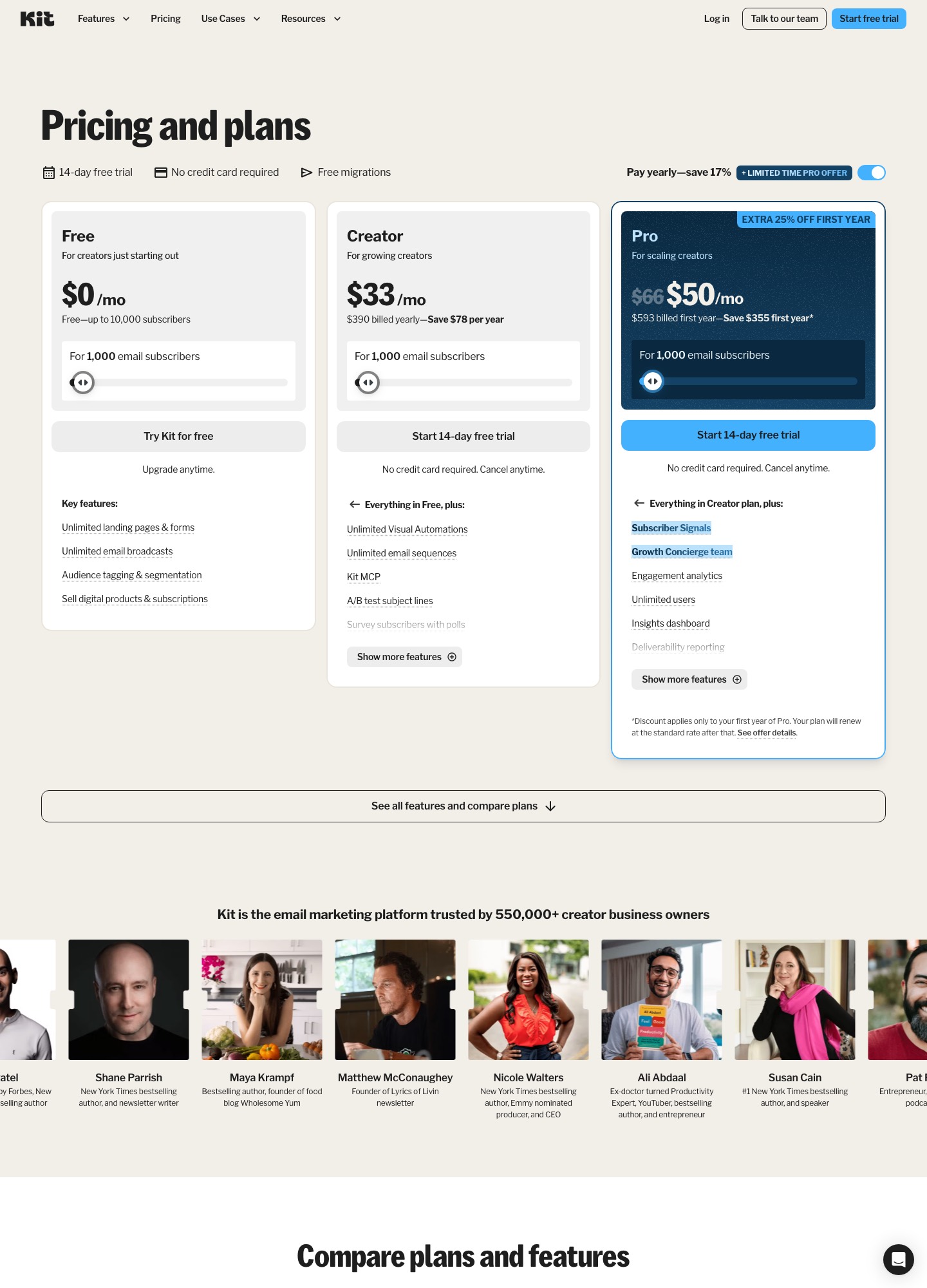
Prices were read from vendor pages on October 7, 2026. Kit's page opens on yearly billing and shows Creator at $33 a month, with $390 billed yearly and a $78 yearly saving. Those two figures imply a monthly-billing rate of about $39 ($390 + $78 = $468, divided by 12). Where a rival below is quoted on monthly billing, hold it against $39, not $33.
Choose by what Kit is not doing for you
| What is missing | Look at | Price (vendor page) | The catch |
|---|---|---|---|
| Automations at a lower monthly bill | MailerLite | Free: 250 subscribers, 2,500 emails a month. Comfort $19 a month at 1,000 subscribers | The free list stops at 250; confirm which automations the free plan runs in a trial |
| A free plan with monetization tools | beehiiv | Free: 2,500 subscribers, unlimited sends, 1 publication. Lite $49 a month (yearly billing) | Automations and paid subscriptions begin on Lite, so the same paywall sits one step up |
| A website and paid memberships in one product | Ghost | Starter $16, Publisher $29 a month for up to 1,000 members, billed yearly | No free plan; paid subscriptions begin on Publisher |
| The lowest paid price at 1,000 subscribers | Buttondown | Free up to 100 subscribers; Basic $9 up to 1,000; Standard $29 up to 5,000 | Check automation and sequence features against what you use |
| A design-led brand that also sells products | Flodesk | Lite $25 ($19 annually); Pro $28 ($25 annually) at up to 1,000 subscribers | Lite has one workflow, and the free plan sends no email |
| A very large list on a small budget | EmailOctopus | Free: 2,500 subscribers, 10,000 emails. Pro $9 a month billed yearly with the selector at 10,000 subscribers | The email allowance shown at 10,000 subscribers is 10,000 a month |
What Kit leaves out of the free plan
Broadcasts yes, sequences no
Kit's free plan lists unlimited landing pages and forms, unlimited email broadcasts, audience tagging and segmentation, and the ability to sell digital products and subscriptions. Creator adds unlimited Visual Automations, unlimited email sequences, A/B-tested subject lines, subscriber polls and removal of Kit branding, and the pricing data also lists SMS marketing on that tier. Everything in the second list is the machinery of a welcome series, which is why a creator with a growing list tends to meet the paywall on the day they want one.
Put a price on it. A creator with 1,000 subscribers who wants a five-email welcome sequence pays $390 a year on Creator, or about $468 on monthly billing. Staying free costs nothing and means sending that welcome by hand as a broadcast. Neither is wrong, but the number to compare with an alternative is $390 to $468 a year, not the $0 headline.
The price follows the subscriber slider
Both paid prices on the capture are quoted "for 1,000 email subscribers", and the slider under each moves the price as your list grows. This page therefore quotes Kit's paid prices only at 1,000. At 5,000 or 10,000 you need to set the selector yourself, and the free plan's 10,000-subscriber ceiling is the only larger number Kit publishes in text.
The Pro offer lasts one year
Pro shows $50 a month against a struck-through $66, with $593 billed for the first year. A footnote says the discount applies only to the first year of Pro and that the plan renews at the standard rate. The standard rate on yearly billing is $66 × 12 = $792, so year two costs $199 more than year one ($792 − $593). Pro adds Subscriber Signals, unlimited users, engagement analytics, deliverability reporting and a newsletter referral system. If you evaluate Pro against a rival, use $66 as Kit's price, not $50.
Six alternatives and what each is good for
beehiiv: a free plan built for growth, with the same step up
beehiiv's free plan allows up to 2,500 subscribers with unlimited sends, one publication and one team seat. Lite is shown at $49 a month on yearly billing and is listed for up to 100,000 subscribers, with paid subscriptions, automations and audience polls. Pro is $95 with advanced analytics, priority support and 10 team seats, and both paid plans have free trials. Its feature list includes a website, podcasts, a community, digital products and an ad network. Like Kit, it holds automations behind the first paid plan, so it suits a creator whose reason to move is monetization or an ad network rather than the paywall itself. Against Kit Creator, $49 is $16 a month more than $33 ($192 a year), on the headline prices; set both selectors to your own count before you accept that gap.
MailerLite: the lower bill at 1,000 subscribers
Comfort is $19 a month at 1,000 subscribers, $49 at 5,000 and $89 at 10,000, and Power is $39, $69 and $129. At 1,000 subscribers Comfort is $20 a month below Kit's monthly-billing equivalent of $39 ($240 a year), or $14 below Creator's $33 yearly rate ($168 a year). The free plan allows 250 subscribers, two seats and 2,500 emails a month, and its pricing page describes it as a real taste of the full platform. MailerLite also lists landing pages, digital products and A/B testing. The honest limit is the free list size: 250 is 40 times smaller than Kit's.
Buttondown: a plain, inexpensive newsletter tool
Buttondown's free plan stops at 100 subscribers, Basic is $9 a month up to 1,000 and Standard is $29 up to 5,000. At 1,000 subscribers Basic costs $24 a month less than Creator's $33 ($288 a year). The page text lists only tiers and subscriber limits, so before you move a sequence-heavy program, open a trial and rebuild your welcome series to see whether it does what Creator does.
Ghost: your own site, memberships and newsletter together
Ghost's pricing is for Ghost(Pro), its managed hosting, and the software is also open source if you prefer to host it yourself. Starter is $16 a month billed yearly for up to 1,000 members with one staff user, a website and an email newsletter; Publisher is $29 with three staff users, custom themes, paid subscriptions and analytics; Business is $199 for up to 10,000 members and 15 staff users. Ghost lists 0% transaction fees on paid subscriptions and Stripe among its integrations. For a writer who wants the site and the paid tier in one place, Publisher at $29 is the entry plan that matters, not Starter.
Flodesk: for creators whose emails are the brand
Flodesk prices on active subscribers and has a free plan for forms, landing pages and link-in-bio pages without email sending. Lite is $25 a month ($19 billed annually) at up to 1,000 subscribers with unlimited sends and one workflow. Pro is $28 ($25 annually) with unlimited workflows, integrated checkout and two seats, and Everything is $54 ($49 annually) with sales pages and payment plans. Pro's $28 monthly rate sits below both Creator's $33 yearly-billing figure and its roughly $39 monthly equivalent, and it ships workflows and a checkout, which is the comparison worth testing.
EmailOctopus: a large list for a few dollars
EmailOctopus allows 2,500 subscribers and 10,000 emails a month on its free plan, with its branding on emails, reports kept for 30 days and one landing page, form and user. Pro is $9 a month billed yearly, shown with the selector at 10,000 subscribers and 10,000 emails a month, with reports kept indefinitely and unlimited landing pages, forms and users. Mind the allowance: 10,000 emails across 10,000 subscribers is one send each per month, and even the free plan's 2,500 subscribers can be mailed only four times a month (10,000 ÷ 2,500). That is fine for a monthly digest and not for a weekly newsletter.
What each option costs at four list sizes
| Subscribers | Kit | Priced by list size | Other units |
|---|---|---|---|
| 500 | Free (no automation) | MailerLite Comfort $12 ($10.80 billed annually); AWeber Lite $15 for 5,000 sends | Buttondown Basic $9 (up to 1,000); beehiiv free |
| 1,000 | Creator $33 (yearly billing), about $39 monthly | MailerLite Comfort $19, Power $39; Flodesk Lite $25, Pro $28 | Buttondown Basic $9; Ghost Starter $16 (billed yearly) |
| 5,000 | Set the selector | MailerLite Comfort $49, Power $69 | Buttondown Standard $29 (up to 5,000) |
| 10,000 | Free for broadcasts only; paid price on the selector | MailerLite Comfort $89, Power $129 | EmailOctopus Pro $9 (billed yearly, 10,000 emails a month); Ghost Business $199 (billed yearly) |
A worked case: a recipe writer has 1,000 subscribers, a weekly issue and a six-email welcome series, and plans to sell a $20 digital cookbook. On Kit that needs Creator, $390 billed yearly. Buttondown Basic at $9 would be $108 a year, which only holds if its sequence features cover the six emails. MailerLite Comfort at $19 monthly is $228 a year and lists digital products and automation. Flodesk Pro at $28 monthly is $336 a year and lists integrated checkout. Rank by whichever of those features the writer would truly use in week one, then price it.
Exporting your subscribers from Kit
- Start from the Subscribers page. Per Kit's export guide, go to Subscribers in the new navigation, click Status and choose Confirmed subscriber to export your active people. Repeat later for other statuses you need to keep as suppressed.
- Select everyone, not just the page. Tick the checkbox at the top of the list to select the current page, then click Select all to cover every subscriber in your account. If the button reads Deselect all, everyone is already selected. Kit says an export that comes back missing subscribers likely skipped this step.
- Click the three dots, then Export. A pop-up confirms processing. A large list can take several minutes.
- Download the file within five days. Kit emails a download link to the address on your account, and the guide says export links expire after five days. If one lapses, run the export again. When a team member runs the export, the link goes to the account owner.
- Export segments separately if you rely on them. Open the segment from the sidebar on the Subscribers page, select all, and use the same bulk Export action.
- Read the columns before importing. The default CSV has first name, email address, created date and time, status, tags, location, attribution data and custom fields. Map each to a field in the new tool, and carry the status column over so unsubscribed and bounced people stay suppressed.
- Save a copy. Kit suggests keeping the file in cloud storage and on a computer or external drive until the new tool has sent a full cycle of mail.
| What you need | How it leaves Kit | What to do next |
|---|---|---|
| Subscribers, tags and custom fields | One CSV, columns for each | Import tags as tags or groups in the new tool |
| Where each person signed up | The attribution data column | Keep it in a custom field for consent evidence |
| Segments | Selected in the sidebar and exported | Recreate each filter in the new tool |
| Visual Automations and sequences | The export guide covers subscribers only | Rebuild from a written map of each trigger and wait |
| Products and subscriptions sold through Kit | Not covered by the subscriber export | Confirm separately how buyers move before you cancel |
Rebuilding a sequence: what to write down first
Because the subscriber export does not carry sequence logic, the migration is mostly transcription. For each sequence, write four lines before you open the new tool: what starts it (a tag, a form, a purchase), the order of the emails and the wait before each, what ends it for a person, and what tag or field you set when they finish. A creator with a welcome sequence, a lead-magnet sequence and a launch sequence has twelve lines to copy, which is an afternoon of work and not a project.
Then test with three addresses of your own: one that joins as new, one that buys partway through, and one that unsubscribes partway through. The second and third are the cases a rebuilt sequence most often gets wrong, because the end rule is the line people forget to write down. Run the test in the new tool before you cancel Kit, and keep the Kit account for a full cycle of real mail.
When Kit is the right place to stay
If you send broadcasts to a list of several thousand and never run a sequence, Kit's free plan is hard to beat on subscriber headroom: 10,000 is four times beehiiv's free ceiling and 40 times MailerLite's. Move only when you need the sequence or automation and the Creator price is what stops you, or when you want a site, an ad network or a lower monthly bill at the same size.
FAQ
Is Kit free?
Kit has a free plan for up to 10,000 subscribers with unlimited landing pages, forms and email broadcasts, tagging and segmentation, and digital product sales. It does not include Visual Automations or email sequences, which start on Creator, and removing Kit branding also begins on Creator.
How much does Kit Creator cost?
Kit's pricing page shows Creator at $33 a month for 1,000 email subscribers, billed yearly as $390, and says that saves $78 a year. That implies about $39 a month on monthly billing. The price rises with the subscriber selector, so set it to your own count.
What is the cheapest Kit alternative at 1,000 subscribers?
On the pages read, Buttondown Basic at $9 a month is the lowest paid price for up to 1,000 subscribers, followed by Ghost Starter at $16 billed yearly and MailerLite Comfort at $19. They are not equal in features, so rebuild your welcome series in a trial before judging on price.
Can I export my Kit sequences and automations?
Kit's export guide covers subscribers and the data in their CSV. It does not describe exporting a sequence or a Visual Automation as a working copy, so assume you will rebuild each one from a written map of its triggers, waits and exits.
How long is my Kit export link valid?
Kit's guide says export links expire after five days. The link goes to the email address on your Kit account, or to the account owner if a team member ran the export. If it lapses, run the export again and download it sooner.
Is beehiiv’s free plan better than Kit’s?
It depends on your list. Kit's free plan allows 10,000 subscribers but no sequences. beehiiv's allows 2,500 with unlimited sends and one publication, and holds automations behind Lite at $49 a month on yearly billing. For a big list that only broadcasts, Kit is roomier. For monetization tools, beehiiv lists an ad network.
All alternatives · Mailchimp alternatives · MailerLite alternatives · MailerLite vs Mailchimp · Personalization guide · How to choose an email tool · Email tools for Patreon creators